Industrial sensors · 4–20 mA · Arduino · ESP32 · ADS1115
4–20 mA Converter: Read a 4–20 mA Transmitter with Arduino & ESP32
A 4–20 mA converter turns loop current into a voltage your ADC can read. For most projects that converter is one precision resistor. The hard parts are choosing its value for your board, keeping the transmitter powered, catching a broken wire, and making sure a wiring fault can’t put 24 V on a 3.3 V pin.
Ramanu Systems · Pune, India · 3-minute answer, full engineering notes below
Put a burden resistor between the loop’s return wire and GND, and read the voltage across it: V = I × R. Size it so 22 mA still fits the ADC: about 220 Ω on an Arduino Uno, 107 Ω on a classic ESP32, 90.9 Ω on an ADS1115 at ±2.048 V. Treat anything below 3.6 mA or above 21 mA as a fault, not a reading.
Is this your problem?
If any of these match your 4–20 mA sensor setup, read on:
- The ADC reads 0 with the transmitter connected
- Readings stop rising near full scale
- The value jumps or drops when the pressure is high
- The transmitter’s display flickers or resets
- You can’t tell a broken wire from a real zero
- An ESP32 or Arduino pin died after a wiring mistake
How a 4–20 mA loop works, in one picture
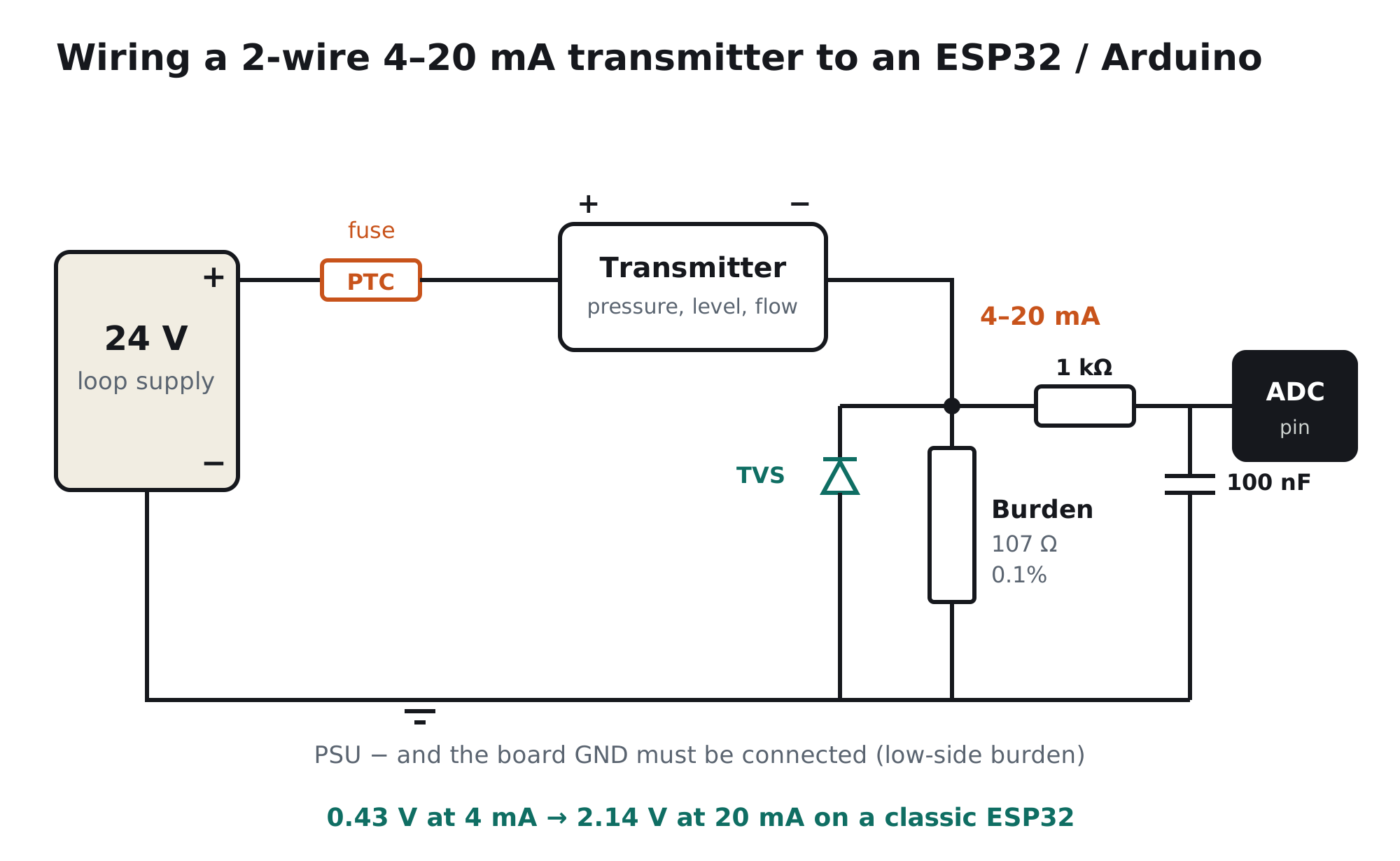
A 2-wire transmitter doesn’t output a voltage. It sits in series with a power supply and sets the current through the whole loop: 4 mA at the bottom of its range, 20 mA at the top. The same current flows through every part of the loop, so cable resistance doesn’t change the signal. You read it by passing the current through a known resistor and measuring the voltage across it.
Calculate your burden resistor
Pick your board and your transmitter’s range. The calculator picks a standard burden value with room to detect faults, checks that the transmitter still gets enough voltage at 20 mA, and shows what happens if the loop shorts. Drag the current slider to see the reading at any loop current.
4–20 mA calculator
ADC pin
–
–
–
| Fault thresholds (NAMUR NE43): below 3.6 mA / above 21 mA | – |
| ADC reading at 4 mA / 20 mA | – |
| Resolution (one ADC step) | – |
| Current where the ADC saturates | – |
| Voltage left for the transmitter at 20 mA | – |
| Burden power at 20 mA | – |
| If the transmitter shorts: burden current / power | – |
Code for your board
Burden values are E96 (1%); use 0.1% for best accuracy. Board limits from the Microchip, Espressif, Raspberry Pi and TI datasheets; fault thresholds from NAMUR NE43.
The 2-minute test: is it the transmitter or the ADC side?
Before you blame the sensor, test the burden and code with a fake loop. Disconnect the transmitter and its supply, then connect two AA cells in series with a 150 Ω resistor from the top of the burden to GND (cell + to the resistor, cell − to GND). With a 107 Ω burden that pushes about 11–12 mA, a known, quiet current. Check it with a multimeter in its mA range. If your code reads the same current, the ADC side is right and the problem is in the loop or the transmitter.
// Print loop current once a second (ESP32, ADC1 pin 34, 107 ohm burden)
void loop() {
  uint32_t mv = 0;
  for (int i = 0; i < 32; i++) mv += analogReadMilliVolts(34);
  float mA = (mv / 32.0) / 107.0;
  Serial.printf("%.2f mA\n", mA);
  delay(1000);
}
Wire it right in 3 steps
- Put the burden on the low sideLoop supply + to the transmitter's + terminal. Transmitter − to the top of the burden. Bottom of the burden to GND, and the loop supply's − to the same GND. The ADC reads the top of the burden through a 1 kΩ resistor with 100 nF to GND at the pin.
- Check the voltage budgetThe supply must cover the transmitter's minimum voltage plus the drop across the burden and cable at 20 mA: Vsupply ≥ Vmin + 0.02 A × (Rburden + Rcable). Most 2-wire transmitters need around 8 to 12 V; check yours. A 24 V supply usually leaves plenty of margin.
- Protect the pin and detect faultsAdd a PTC fuse in the loop and a TVS across the burden, and keep the 1 kΩ in series with the pin. In code, flag anything below 3.6 mA (broken wire, no power, sensor fault) or above 21 mA (short or sensor fault) instead of showing it as a value.
2-wire, 3-wire or 4-wire?
| Transmitter type | How it's powered | How to wire the burden |
|---|---|---|
| 2-wire (loop-powered) | From the loop itself | Supply + → TX+, TX− → burden → GND (Figure 1) |
| 3-wire | Separate + and common GND | Signal output → burden → GND (shared with supply −) |
| 4-wire | Separate supply (often mains) | Output + → burden → output − tied to your GND. Isolated output is best |
Which board are you using?
| Board / ADC | Burden (E96) | 4 mA → 20 mA on the pin | Notes |
|---|---|---|---|
| Arduino Uno / Nano (5 V ref) | 221 Ω | 0.88 → 4.42 V | Leaves room to see faults up to about 22 mA |
| Arduino, 3.3 V on AREF / Pi Pico | 147 Ω | 0.59 → 2.94 V | Pico ADC pins are not 5 V tolerant |
| ESP32 (classic) | 107 Ω | 0.43 → 2.14 V | Stays inside the 0.15–2.45 V accurate range; use ADC1 pins |
| ESP32-S3 | 137 Ω | 0.55 → 2.74 V | 0–3.1 V range at 12 dB |
| ADS1115, ±2.048 V | 90.9 Ω | 0.36 → 1.82 V | Finest resolution: under 1 µA per step |
The common 250 Ω value gives 1 to 5 V. That suits a 5 V Arduino only if you don't need to see over-range faults, and it will damage a 3.3 V board at 20 mA.
4–20 mA converter options
| Option | Good for | Watch out for |
|---|---|---|
| Burden resistor only | Cheapest; bench tests, one sensor, short cable | No protection; a short can kill the pin. Add PTC, TVS and series resistor yourself |
| Ready-made 4–20 mA to voltage module | Quick prototypes; jumper-selected output ranges | Usually one channel; check the input protection, the output range against your ADC, and whether it needs its own supply |
| Burden + ADS1115 | High resolution, several channels over I²C | Keep inputs below VDD + 0.3 V; still needs protection |
| Isolated converter (DIN rail) | Long cables, noisy plants, sensors on different grounds | Costly and bulky, but the only cure for ground loops |
| Protected analog front-end (Ramanu, coming soon) | Up to 4 channels of 4–20 mA, 0–10 V or 0–5 V into ESP32, Arduino or ADS1115 | Not isolated; for isolation use a DIN-rail converter |
Coming soon from Ramanu
4-channel protected 4–20 mA & 0–10 V input for ESP32 / Arduino
Everything on this page, on one board: precision burden, protection and a clean 0–2.0 V output your ADC can read.
- 4–20 mA per channel: 0.1% 165 Ω burden with a PTC fuse, enabled by solder jumper
- Or voltage inputs: 0–3.3 V, 0–6 V, 0–10 V by jumper
- 24 V-rated TVS on every input; output can never exceed 3.3 V
- 4 mA = 0.4 V, 20 mA = 2.0 V: open-loop detection works even on a classic ESP32
- Selectable 5 Hz / 100 Hz / 1 kHz filter, genuine TI op-amps, made in Pune
Still reading wrong? Other common causes
| Cause | What you notice | Fix |
|---|---|---|
| No ground connection between loop supply and board | Random or floating readings | Connect the supply − to the board GND (low-side burden) |
| Loop supply too low | Fine at low pressure, drops or flickers near full scale | Raise the supply, or lower the burden; check the calculator's supply margin |
| Transmitter wired backwards | Always 0 mA | Swap the + and − wires at the transmitter |
| Burden on the high side | The ADC sees close to 24 V | Move the burden to the return leg, between TX− and GND |
| Ground loop between two earthed points | Offset that changes when machines switch on | Use one earth point, or an isolated converter |
| Noisy ADC reference | Steady current but jumpy readings | See our analogRead fluctuating guide |
For engineers: 4–20 mA in numbers
1. Ranges and fault signalling (NAMUR NE43)
| Loop current | Meaning |
|---|---|
| Below 3.6 mA | Failure (low): open loop, no power, sensor fault |
| 3.6 to 3.8 mA | Under-range, measurement still valid |
| 3.8 to 20.5 mA | Measurement range |
| 20.5 to 21 mA | Over-range |
| Above 21 mA | Failure (high) |
To see a high fault you need ADC headroom above 21 mA, which is why the calculator sizes the burden for 22 mA rather than 20 mA.
2. Burden choice: resolution versus loop voltage
A larger burden gives more volts per milliamp, so better resolution and a low-fault level further above the ADC's floor. It also costs loop voltage: at 20 mA every 100 Ω drops 2 V that the transmitter no longer gets. The burden's tolerance is a direct gain error: a 1% resistor reads up to 1% off, a 0.1% resistor 0.1%. Its temperature coefficient matters in hot enclosures, so choose 25 ppm/°C or better for precision.
3. Resolution at the input
One ADC step in milliamps is LSB / R. A classic ESP32 at about 0.8 mV per step with 107 Ω resolves about 7.5 µA, roughly 1/2100 of the 16 mA span, but its ±60 mV total error (Espressif datasheet) means about ±0.56 mA before calibration. An ADS1115 at ±2.048 V with 90.9 Ω resolves 0.7 µA. Calibrate at 4 and 20 mA for real accuracy.
4. HART and isolation
HART devices superimpose a digital signal on the loop and need at least about 230 Ω of loop resistance to work. A plain analog reading doesn't. If the transmitter and your board are earthed at different points, the ground difference adds directly to the burden voltage; only galvanic isolation removes that.
Frequently asked questions
What is a 4–20 mA converter?
A circuit that turns a 4–20 mA loop current into a voltage an ADC can read. The simplest version is a single precision resistor (the burden): V = I × R. Ready-made modules add protection, scaling and sometimes isolation.
What resistor converts 4–20 mA to 0–5 V or 0–3.3 V?
250 Ω gives 1–5 V and 165 Ω gives 0.66–3.3 V. To keep room for fault detection above 21 mA, use about 221 Ω on a 5 V Arduino, 147 Ω on a 3.3 V ADC and 107 Ω on a classic ESP32.
Can an ESP32 read a 4–20 mA sensor?
Yes, with a burden resistor of about 107 Ω to GND, which keeps 4–20 mA inside the ESP32's accurate 0.15–2.45 V range. Use an ADC1 pin, analogReadMilliVolts(), a 1 kΩ series resistor with 100 nF at the pin, and a PTC and TVS on the loop.
How do I wire a 2-wire 4–20 mA transmitter to an Arduino?
Connect the loop supply + to the transmitter +, the transmitter − to a 221 Ω burden resistor, and the other end of the burden to GND. Connect the supply − to the Arduino GND, and read the top of the burden with an analog pin through 1 kΩ.
Why does 4–20 mA start at 4 mA?
So that a broken wire (0 mA) can be told apart from the bottom of the range (4 mA), and so a 2-wire transmitter has current to run on. Readings below 3.6 mA are treated as a fault.
How do I detect a broken wire on a 4–20 mA loop?
Check the current in code: below 3.6 mA means open loop, lost power or a sensor fault; above 21 mA means a short or sensor fault (NAMUR NE43). Make sure your burden leaves the 3.6 mA level above the ADC's floor and 21 mA below its top.
Do I need an isolated 4–20 mA converter?
Not for one sensor on a short cable sharing your board's ground. Use isolation for long runs, noisy plants, several transmitters powered from different supplies, or any sensor earthed at a different point than your controller.
Read industrial sensors safely
Get the protected front-end when it launches
4 channels of 4–20 mA or 0–10 V into your ESP32, Arduino or ADS1115, without risking a pin. Genuine TI parts, made in India.