Guide · ADS1115 · Arduino · ESP32 · Raspberry Pi
ADS1115 Guide: Wiring, Gain & Accuracy, and How to Spot a Fake Module
The ADS1115 is the go-to 16-bit ADC for Arduino, ESP32 and Raspberry Pi. Most problems come from four things: the wrong gain, inputs above the supply, a 5 V module on a 3.3 V board, and modules that are not really an ADS1115. This guide covers all four, with a calculator and a 2-minute fake test.
Ramanu Systems · Pune, India · 3-minute answer, full engineering notes below
Power the module from the same voltage as your board (3.3 V for ESP32, Pi and Pico). Pick the smallest gain range that still covers your signal, usually ±2.048 V (GAIN_TWO) or ±4.096 V (GAIN_ONE), and never put more than VDD on an input. If readings always step by 16, or it converts much faster than the setting, you have a 12-bit chip, not an ADS1115.
Is this your problem?
- “ADS1115 not found” on the I²C bus
- Readings stuck at 32767 (or 32752)
- Raw values only ever change in steps of 16
- Readings are wrong above about 3.3 V
- Values jump although the input is steady
- It seems faster or slower than the data rate you set
What the ADS1115 does, in one picture
The ADS1115 is a 16-bit ADC with four inputs, a programmable gain amplifier (PGA) and its own voltage reference, so its readings don’t depend on your board’s noisy 3.3 V or 5 V like the built-in ADC does. It talks I²C, so you only need four wires.
| ADS1115 key facts (TI datasheet) | Value |
|---|---|
| Resolution | 16-bit (15-bit for single-ended inputs: 0 to 32767) |
| Inputs | 4 single-ended or 2 differential |
| Gain ranges | ±6.144, ±4.096, ±2.048, ±1.024, ±0.512, ±0.256 V |
| Data rates | 8, 16, 32, 64, 128, 250, 475, 860 samples/s |
| Supply | 2.0 to 5.5 V, about 150 µA while converting |
| Input limit | GND − 0.3 V to VDD + 0.3 V absolute maximum |
| I²C addresses | 0x48, 0x49, 0x4A, 0x4B (set by ADDR) |
Pick the right gain for your signal
The gain range sets both the largest voltage you can read and the size of one step. Choose your supply and your signal’s highest voltage; the calculator picks the best range, warns about inputs above VDD, and gives you the code. Drag the slider to see where any input lands.
ADS1115 gain & range calculator
Input on the ADS1115 pin
– –
–
Code (Adafruit_ADS1X15 library)
Ranges, input impedance and limits from the TI ADS1115 datasheet. Single-ended readings use 15 bits (0 to 32767).
The 2-minute test: is my ADS1115 genuine?
Cheap ADS1115 modules sometimes carry a 12-bit chip. Makers have reported modules labelled ADS1115 that only deliver 12-bit data, and chips that behave like the cheaper ADS1015. The chip marking alone isn’t proof: TI marks the ADS1115 BOGI and the ADS1015 BRPI, but relabelled chips with the right marking have been reported. Two behaviours give a fake away:
- It converts too fastThe same data-rate setting runs an ADS1015 about 16 times faster: 128 instead of 8 samples per second, 1600 instead of 128. Time the conversions and you can tell them apart.
- The lowest 4 bits never changeA 12-bit result is stored in the 16-bit register shifted left by 4, so the raw value always steps by 16. On a genuine ADS1115 those bits change with the input.
- Enter your results belowRun the sketch with about 1 V on A0 (for example a divider from 3.3 V), then type what the Serial Monitor prints.
#include <Wire.h>
#include <Adafruit_ADS1X15.h>
Adafruit_ADS1115 ads;

float measureRate(uint16_t rate) {
  ads.setDataRate(rate);
  const int N = 20;
  unsigned long t0 = micros();
  for (int i = 0; i < N; i++) {
    ads.startADCReading(ADS1X15_REG_CONFIG_MUX_SINGLE_0, false);
    while (!ads.conversionComplete()) {}
    ads.getLastConversionResults();
  }
  return N * 1e6 / (micros() - t0);
}

void setup() {
  Serial.begin(115200);
  if (!ads.begin(0x48)) { Serial.println("ADS1115 not found"); while (1); }
  Wire.setClock(400000);
  ads.setGain(GAIN_TWO);
  Serial.print("Rate at 8 SPS setting:   "); Serial.println(measureRate(RATE_ADS1115_8SPS), 1);
  Serial.print("Rate at 128 SPS setting: "); Serial.println(measureRate(RATE_ADS1115_128SPS), 1);
  ads.setDataRate(RATE_ADS1115_128SPS);
  uint16_t lowBits = 0;
  for (int i = 0; i < 64; i++) lowBits |= (ads.readADC_SingleEnded(0) & 0x000F);
  Serial.println(lowBits ? "Lowest 4 bits change: 16-bit data" : "Lowest 4 bits always 0: 12-bit data");
}

void loop() {}
Is my ADS1115 genuine? Enter your test results
Enter at least one measurement
Run the sketch below, then type what it prints.
Expect the measured rate to be a little below the setting on a genuine chip, because each single-shot reading adds I²C time. A clearly faster result at the 8 SPS setting is the giveaway.
Wire it right in 3 steps
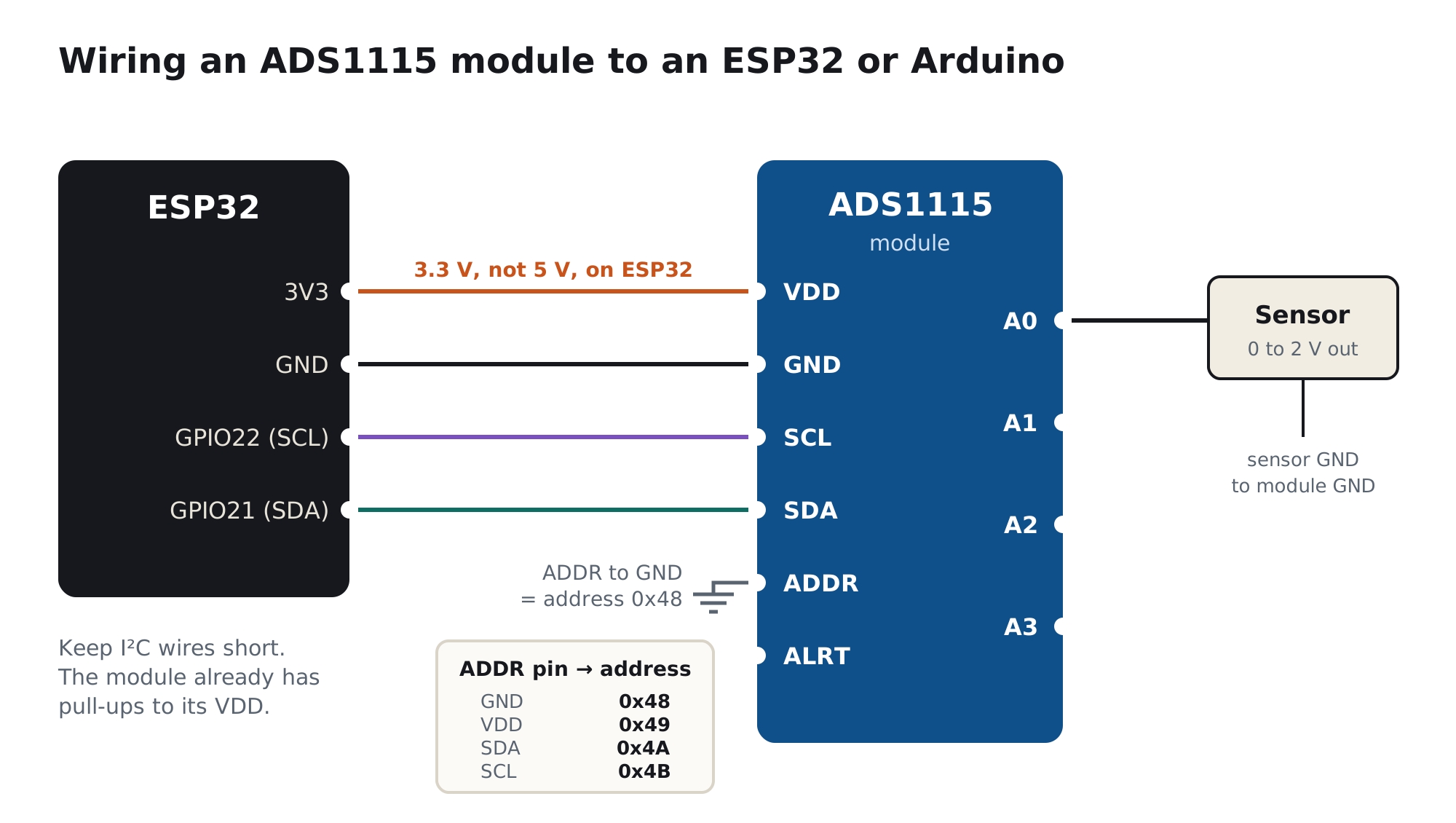
- Match the supply to your boardVDD to 3.3 V on an ESP32, Raspberry Pi or Pico; 5 V or 3.3 V on an Arduino Uno. Most modules have I²C pull-up resistors to their own VDD, so a 5 V module pulls the ESP32's SDA and SCL to 5 V.
- Set the address and connect I²CADDR to GND gives 0x48. SDA and SCL to the board's I²C pins (ESP32: GPIO21 and GPIO22; Uno: A4 and A5; Pi: GPIO2 and GPIO3). Keep the wires short. Run an I²C scanner if the library says "not found".
- Keep inputs inside 0 to VDDConnect the sensor output to A0 and its ground to the module's GND. Signals above VDD need a divider or a front-end. Add 1 kΩ in series and 100 nF to GND at the input for protection and filtering.
Which board are you using?
| Board | Module VDD | I²C pins | Library |
|---|---|---|---|
| Arduino Uno / Nano | 5 V or 3.3 V | A4 (SDA), A5 (SCL) | Adafruit_ADS1X15 |
| ESP32 | 3.3 V only | GPIO21 (SDA), GPIO22 (SCL) | Adafruit_ADS1X15, or ESPHome ads1115 |
| Raspberry Pi | 3.3 V only | GPIO2 (SDA), GPIO3 (SCL) | adafruit-circuitpython-ads1x15 |
| Raspberry Pi Pico | 3.3 V only | Any I²C pair, e.g. GP4 / GP5 | MicroPython or CircuitPython ADS1x15 drivers |
Coming soon from Ramanu
A protected front-end made for the ADS1115
Read 5 V, 10 V and 4–20 mA sensors with your ADS1115 without risking the chip.
- 4 channels, jumper ranges 0–3.3 V, 0–6 V, 0–10 V, plus a 4–20 mA option
- 0–2.0 V output: matches the ADS1115 ±2.048 V range for nearly full 15-bit resolution
- Low-impedance op-amp outputs: no input-impedance error, no clipping, never above 3.3 V
- 24 V-rated input protection, selectable 5 Hz / 100 Hz / 1 kHz filter, genuine TI parts
Still wrong? Other common causes
| Cause | What you notice | Fix |
|---|---|---|
| Wrong I²C address or wiring | "Not found" or reads 0 | Run an I²C scanner; check ADDR and that SDA/SCL aren't swapped |
| Input above the gain range | Stuck at 32767 | Use a larger range, or scale the input down |
| Small negative readings with the input at 0 V | −1 to −3 counts | Normal offset (up to ±3 LSB); clamp to 0 in code |
| Floating input | Random values on unused channels | Tie unused inputs to GND |
| Noisy sensor supply or shared ground | Jumps when Wi-Fi or a motor switches | Clean 3.3 V for the sensor; see the ADC noise guide |
| Reading faster than possible | Same value repeated | Wait for the conversion (single-shot) or lower the read rate |
For engineers: ADS1115 accuracy in numbers
1. Ranges, step size and input impedance
| Gain range | Library setting | One step (LSB) | Common-mode input impedance |
|---|---|---|---|
| ±6.144 V | GAIN_TWOTHIRDS | 187.5 µV | 10 MΩ |
| ±4.096 V | GAIN_ONE | 125 µV | 6 MΩ |
| ±2.048 V | GAIN_TWO | 62.5 µV | 6 MΩ |
| ±1.024 V | GAIN_FOUR | 31.25 µV | 3 MΩ |
| ±0.512 V | GAIN_EIGHT | 15.6 µV | 100 MΩ |
| ±0.256 V | GAIN_SIXTEEN | 7.8 µV | 100 MΩ |
The input impedance loads your source. A source impedance of 100 kΩ on the ±2.048 V range reads about 1.6% low; 10 kΩ about 0.2%. Buffer high-impedance sources or calibrate the error out.
2. Noise and accuracy
At ±2.048 V and 3.3 V supply, TI specifies 62.5 µVRMS input-referred noise at both 8 and 128 samples/s: about one LSB. Gain error is 0.01% typical and 0.15% maximum at 25 °C, and offset is within ±3 LSB. In practice, the sensor, its supply and the wiring usually limit accuracy long before the ADS1115 does.
3. Why the range must not exceed VDD
The PGA ranges are referenced to the ADS1115's internal reference, not its supply, but the input pins themselves are protected by diodes to VDD and GND. TI states that with VDD at 3.3 V and the ±4.096 V range, only signals up to 3.3 V can be measured. On a 3.3 V system, the ±4.096 V range therefore loses about 0.3 bit, and ±6.144 V about 0.9 bit.
4. ADS1115 versus ADS1015
| ADS1115 | ADS1015 | |
|---|---|---|
| Resolution | 16-bit | 12-bit |
| Data rates | 8 to 860 SPS | 128 to 3300 SPS |
| Top-side marking | BOGI | BRPI |
| Pinout and registers | Identical, which is why the two are easily swapped or relabelled | |
Frequently asked questions
What is the ADS1115?
A 16-bit, 4-channel analog-to-digital converter from Texas Instruments with a programmable gain amplifier, an internal reference and an I²C interface. It reads voltages far more precisely than the built-in ADC of an Arduino or ESP32.
How do I connect an ADS1115 to an ESP32?
VDD to 3.3 V, GND to GND, SDA to GPIO21, SCL to GPIO22, and ADDR to GND for address 0x48. Keep every input between 0 V and 3.3 V. Don't power the module from 5 V, because its pull-ups would put 5 V on the ESP32's I²C pins.
Which gain should I use on the ADS1115?
The smallest range that still covers your highest input. For signals up to 2 V, use ±2.048 V (GAIN_TWO); up to 3.3 V on a 3.3 V module, ±4.096 V (GAIN_ONE). Never rely on ±6.144 V to read voltages above VDD.
Can the ADS1115 measure 5 V or 12 V?
Not directly on a 3.3 V module: inputs must stay below VDD + 0.3 V. Powered from 5 V it can read up to 5 V on the ±6.144 V range. For 12 V, use a voltage divider or a protected front-end to scale the signal into range.
How can I tell if my ADS1115 is fake?
Time its conversions at the 8 samples-per-second setting: a genuine ADS1115 manages about 8, while a 12-bit ADS1015 runs about 128. Also check the raw readings: if they always step by 16, you are getting 12-bit data. The chip marking (BOGI for ADS1115) helps, but relabelled chips exist.
Why are my ADS1115 readings stuck at 32767?
The input is above the selected gain range. Choose a larger range, or scale the input down. If the input is also above VDD, fix that first, because it can damage the chip.
Is the ADS1115 better than the ESP32 ADC?
For accuracy, yes: it has a real 16-bit converter, its own reference and no non-linear zones, while the classic ESP32 ADC is only specified from 0.15 to 2.45 V with about ±60 mV error. The ESP32 ADC is much faster, though; the ADS1115 tops out at 860 samples per second.
Get the most from your ADS1115
Give your sensors a supply as clean as the converter
A 16-bit ADC shows every millivolt of noise on your sensor's supply. Power sensors and the ADS1115 from a quiet 3.3 V rail, and join the waitlist for the protected front-end. Genuine TI parts, made in India.