Free tool · Arduino · ESP32 · Pi Pico · ADS1115
Voltage Divider Calculator for Arduino & ESP32 ADC
This voltage divider calculator does more than Vout = Vin × R2 / (R1 + R2). Pick your board and it chooses real resistor values, shows the ADC reading, and checks the things that make dividers read wrong: the ADC’s usable range, source impedance, tolerance and pin limits.
Ramanu Systems · Pune, India · 1-minute answer, full engineering notes below
Choose R1 and R2 so your highest input lands just below the ADC’s usable top: about 4.8 V on an Arduino Uno, 2.45 V on a classic ESP32, 2.0 V on an ADS1115 at ±2.048 V. Keep R1 ∥ R2 near 10 kΩ (or add 100 nF at the pin), and calibrate once with a multimeter.
Calculate your divider
Pick your board, type the highest voltage you will ever measure, and the calculator picks a standard resistor pair. Already have resistors? Switch to Check resistors I already have.
Calculator
ADC pin
– on the pin
–
–
| Usable ADC range on this board | – |
| Share of the ADC range you use | – |
| ADC reading at max input | – |
| Resolution at the input (one ADC step) | – |
| Input voltage where the ADC saturates | – |
| Input voltage that exceeds the pin’s absolute maximum | – |
| Divider source impedance (R1 ∥ R2) | – |
| Worst-case error from resistor tolerance | – |
| Divider current at max input | – |
| Power in R1 / R2 | – |
| Battery drain from the divider | – |
| With 100 nF at the ADC pin: bandwidth, settling | – |
Code for your board
Calibrate once: measure the real input with a multimeter and adjust RATIO until the reading matches. Board limits come from the Microchip, Espressif, Raspberry Pi and TI datasheets cited at the end of this page.
Is your divider reading wrong?
A divider that is correct on paper often reads wrong on the board. If any of these sound familiar, the calculator's warnings above explain why:
- The ADC reads lower than your multimeter
- The ESP32 reads 0 for small voltages
- Readings stop rising above a certain voltage
- Values change when you read another channel first
- The battery drains even when the project sleeps
- An ADC pin stopped working after a voltage spike
Why a divider isn't just a ratio, in one picture
The formula assumes nothing draws current from the middle of the divider. A real ADC does: at every sample it connects a small internal capacitor to the pin and charges it within a few microseconds. That charge has to come through R1 and R2. If they are too large, the capacitor doesn't fill in time and the reading comes out low or noisy.
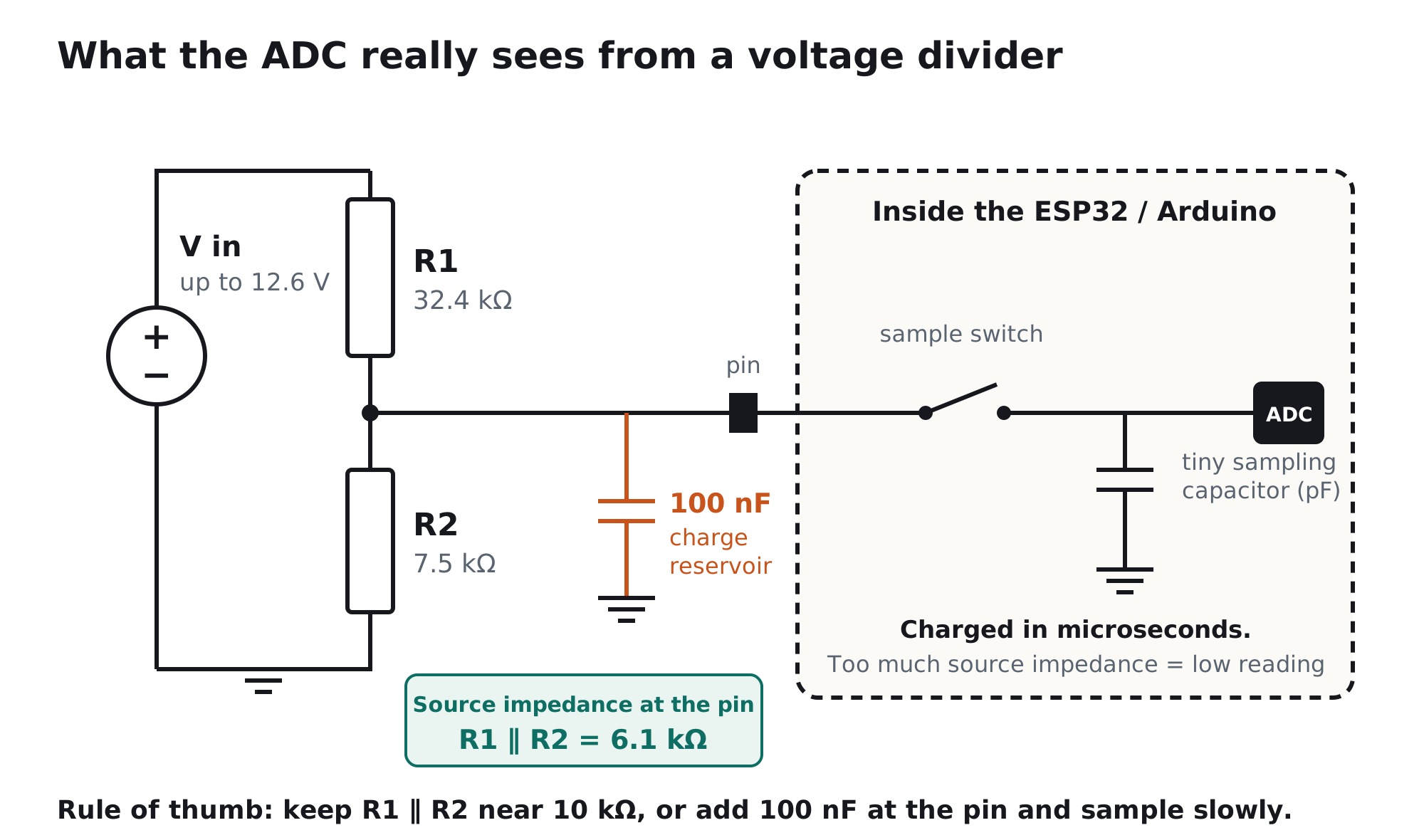
Get an accurate divider in 3 steps
- Fit the range, not the formulaMap your highest input to just below the top of the ADC's usable range, not its nominal range. On a classic ESP32 that is about 2.45 V, because Espressif only specifies 150 to 2450 mV at 11 dB attenuation. Leave a few percent of headroom for a charging battery or a 5.25 V USB supply.
- Keep the impedance low, or add a capacitorAim for R1 ∥ R2 around 10 kΩ. The ATmega328P datasheet says its ADC is optimised for sources of about 10 kΩ or less. For battery monitoring, where you want megaohms, add 100 nF from the pin to GND and read slowly.
- Calibrate once1% resistors can shift the ratio by up to about 2%, and the ESP32's own error is larger. Measure the real input with a multimeter, compare it with your reading, and correct the
RATIOconstant in the code the calculator gives you.
Which board are you using?
| Board / ADC | Usable input range | Pin absolute max | Source impedance |
|---|---|---|---|
| Arduino Uno / Nano / Mega (5 V ref) | 0 to 5 V, 10-bit | VCC + 0.5 V (5.5 V) | ≤ 10 kΩ recommended |
| Arduino, 3.3 V on AREF | 0 to 3.3 V, 10-bit | 5.5 V | ≤ 10 kΩ recommended |
| ESP32 (classic), 11 dB | 0.15 to 2.45 V linear, ±60 mV total error | about 3.6 V | ~10 kΩ, or 100 nF at the pin |
| ESP32-S3, 12 dB | 0 to 3.1 V | about 3.6 V | ~10 kΩ, or 100 nF |
| ESP32-C3, 12 dB | 0 to 2.5 V | about 3.6 V | ~10 kΩ, or 100 nF |
| Raspberry Pi Pico | 0 to 3.3 V (ADC_VREF), 12-bit | 3.3 V logic, not 5 V tolerant | ~10 kΩ, or 100 nF |
| ADS1115 on 3.3 V | 0 to 2.048 V (62.5 µV steps) or 0 to 3.3 V | VDD + 0.3 V (3.6 V) | Input impedance 6 MΩ: lower is better |
Coming soon from Ramanu
4-channel analog front-end for ESP32, Arduino & ADS1115
A divider that does the hard parts for you: buffered, filtered and protected, so 5 V and 10 V sensors read correctly and can't damage a 3.3 V pin.
- Jumper ranges: 0–3.3 V, 0–6 V, 0–10 V, plus a 4–20 mA option
- Low-impedance op-amp output: no sampling errors, no 10 kΩ rule
- Selectable filter: 5 Hz, 100 Hz or 1 kHz
- 0–2.0 V output fits the ESP32 linear window and the ADS1115 ±2.048 V range
- Input protection, genuine TI op-amps. Designed & made in Pune, India
Still reading wrong? Other common causes
| Cause | What you notice | Fix |
|---|---|---|
| Divider impedance too high | Reads low; worse when you sample fast or switch channels | Lower R1 and R2, or 100 nF at the pin, or an op-amp buffer |
| Input outside the ESP32 linear range | Wrong near 0 V or above about 2.5 V | Re-scale with the calculator; use analogReadMilliVolts() |
| ADC2 pin on ESP32 with Wi-Fi on | Reads fail or return errors | Move to an ADC1 pin (GPIO32–39) |
| Noisy reference or supply | Readings jump while the input is steady | See our analogRead fluctuating guide |
| Ground shared with a motor or LED strip | Reading shifts when the load turns on | Separate ground return to the divider's bottom |
| Wrong resistor fitted | A steady offset, the same every time | Measure both resistors before soldering |
For engineers: the divider math the calculator uses
1. Ratio, resolution and saturation
Dividing the input also divides the resolution. A 12.6 V battery on a classic ESP32 needs k ≈ 0.188, so one nominal 0.8 mV ADC step becomes about 4.3 mV at the battery, and the datasheet's ±60 mV total error becomes about ±320 mV. The input saturates at Vtop/k and the pin hits its absolute maximum at Vabs/k; the calculator prints both.
2. Source impedance and the sampling capacitor
The divider's Thévenin resistance is Rth = R1 ∥ R2. A SAR ADC's sample-and-hold capacitor must settle through Rth within the sampling time. On the ATmega328P, the datasheet states the ADC is optimised for sources of about 10 kΩ or less. Above that, a 100 nF capacitor at the pin supplies the sampling charge with negligible droop, at the cost of bandwidth: f-3dB = 1 / (2π Rth C) and settling to 1% takes about 4.6 RthC. The calculator shows both for 100 nF.
3. Tolerance error
The worst case is R2 high and R1 low (or the reverse): kmax = R2(1+t) / [R1(1−t) + R2(1+t)]. For small ratios the error approaches about 2t, so 1% resistors give up to about ±2%. This error is fixed for a given board, which is why a single calibration point removes it.
4. Loading by the ADC input
The ADS1115's common-mode input impedance is 6 MΩ on the ±4.096 V and ±2.048 V ranges (TI datasheet). It forms a parallel path with R2 and adds a gain error of about Rth / (Rth + 6 MΩ): 0.1% at 6 kΩ, 1.6% at 100 kΩ. With VDD at 3.3 V, the ±4.096 V range can only measure up to 3.3 V, and inputs must stay below VDD + 0.3 V.
5. When to use a buffer instead
A divider has to trade impedance against current: low impedance for accurate sampling means milliamps through the resistors; low current for battery life means high impedance. An op-amp voltage follower after the divider removes the trade-off. The divider can then be hundreds of kΩ, while the ADC sees an output impedance of a few ohms. Add an RC filter and input clamps and you have an analog front-end.
Frequently asked questions
How do I calculate a voltage divider?
Vout = Vin × R2 / (R1 + R2), where R1 is the top resistor and R2 the bottom one. For an ADC, choose the ratio so your highest input lands just below the ADC's usable top, then check the source impedance R1 ∥ R2. The calculator above does all three steps and picks standard E24 or E96 values.
What resistors do I need to measure 12 V with an ESP32?
For a classic ESP32, keep the pin below about 2.45 V. For a 12 V system that can reach 12.6 V or more, 47 kΩ and 10 kΩ give 2.21 V at 12.6 V with margin. For car batteries that reach 14.4 V while charging, use a smaller ratio such as 56 kΩ and 10 kΩ. Add 100 nF at the pin.
Can an ESP32 read 5 V directly?
No. ESP32 ADC pins are 3.3 V pins, and a classic ESP32 only reads accurately up to about 2.45 V. Use a divider, for example 10 kΩ over 10 kΩ to halve 5 V to 2.5 V on an ESP32-S3, or 12 kΩ over 10 kΩ to stay below 2.45 V on a classic ESP32.
Why is my voltage divider reading lower than my multimeter?
Usually the divider's source impedance is too high for the ADC's sampling capacitor, or the resistors are off by their tolerance. Keep R1 ∥ R2 near 10 kΩ or add 100 nF at the pin, then calibrate once against the multimeter. On an ESP32, also use analogReadMilliVolts() for factory calibration.
What resistor values are best for an Arduino voltage divider?
Keep R1 ∥ R2 at about 10 kΩ or less, which the ATmega328P datasheet recommends, and choose the ratio so the highest input gives just under 5 V (or under your AREF voltage). Use 1% resistors and a 100 nF capacitor at the analog pin.
How do I measure battery voltage without draining the battery?
Use high-value resistors (hundreds of kΩ to 1 MΩ) and a 100 nF capacitor at the ADC pin, and read slowly. Or switch the divider off with a MOSFET between readings. The calculator shows the divider's drain in mAh per day.
Does a voltage divider protect my ADC pin?
Only up to a point. It scales normal voltages, but a surge or a higher-than-expected input still reaches the pin divided by the same ratio. Check the calculator's absolute-maximum row, leave margin, and add a series resistor and clamp, or a protected front-end, for wiring that leaves the board.
Measure it right today
A clean reference makes every divider reading steadier
Power your sensors, Arduino AREF or ADS1115 from a quiet 3.3 V rail. And ask us about the 4-channel analog front-end. Genuine TI parts, made in India.