Troubleshooting · ADC · Arduino Uno / Nano · ESP32 · ADS1115
analogRead Values Fluctuating? Fix ADC Noise on Arduino & ESP32
analogRead fluctuating? The sensor hasn’t moved, but the Serial Monitor says
Before you blame the sensor, check what the ADC measures against: its reference voltage.
Ramanu Systems · Pune, India · 3-minute answer, 12-minute deep dive
On an Arduino Uno or Nano, analogRead() measures your sensor as a fraction of the 5 V supply. On USB or a phone charger, that 5 V is noisy, so every reading wobbles with it. On an ESP32, Wi-Fi bursts and the ADC’s own noise add even more.
Fix: give the sensor and the ADC reference a clean 3.3 V, add 100 nF at the input, and average a few readings. On ESP32, use ADC1 pins, or move to an ADS1115 on a clean rail.
Is this your problem?
If two or more of these sound familiar, the reference or supply is your prime suspect:
- Readings jump by several counts with nothing changing
- It’s worse on a phone charger, or when the laptop is charging
- It gets worse when Wi-Fi, a servo or an LED strip turns on
- Temperature from a TMP36 / LM35 wobbles by a degree or more
- pH, TDS or soil readings drift and never settle
- ESP32 raw values scatter by tens of counts
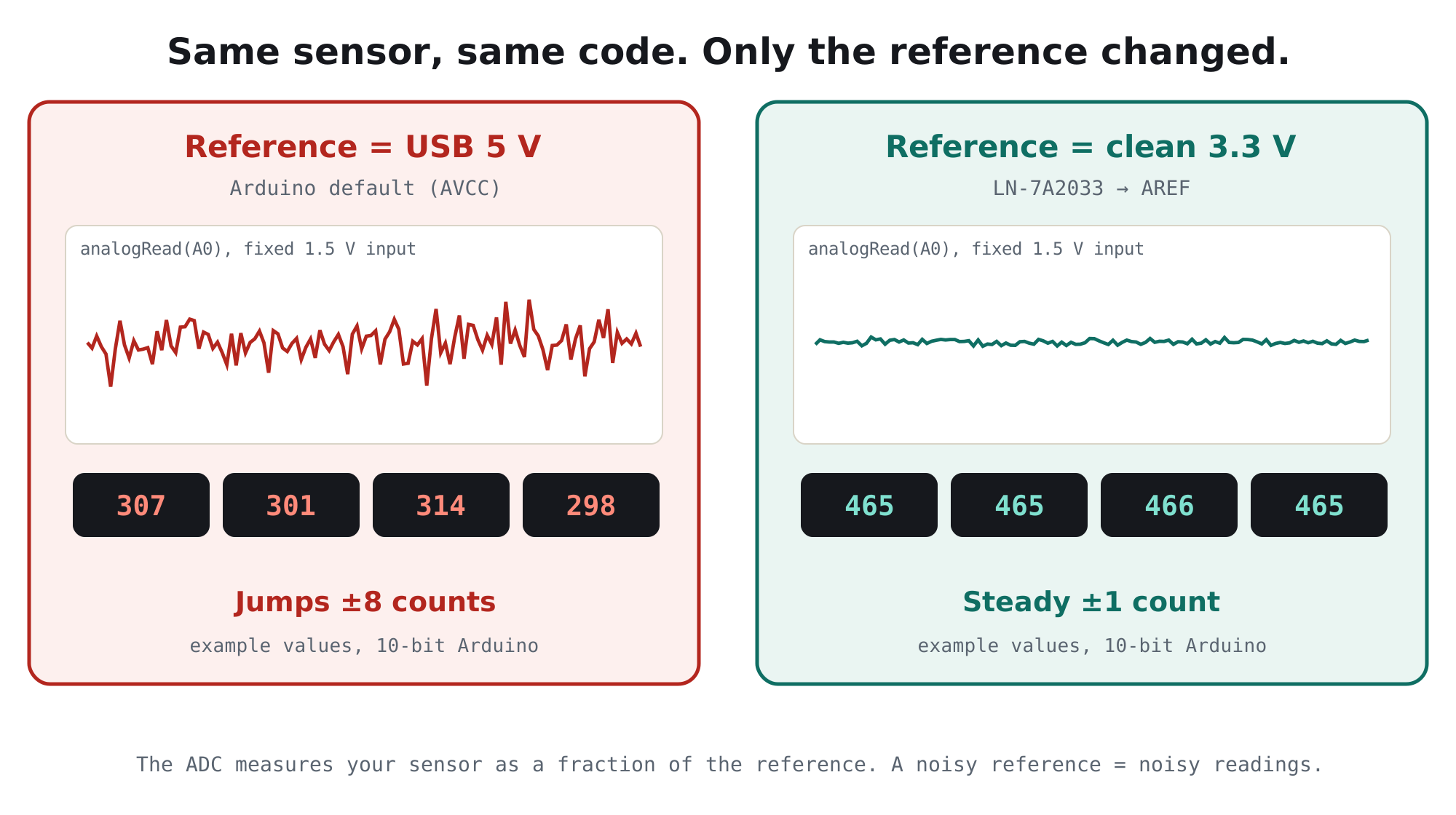
Why it happens, in one picture
An ADC doesn’t measure volts directly. It measures your input as a fraction of a reference voltage: reading = Vin ÷ Vref × 1023. On an Uno or Nano the default reference is the board’s own 5 V. If that 5 V wobbles by 1%, a mid-scale reading wobbles by about 5 counts, even though your sensor didn’t change at all.
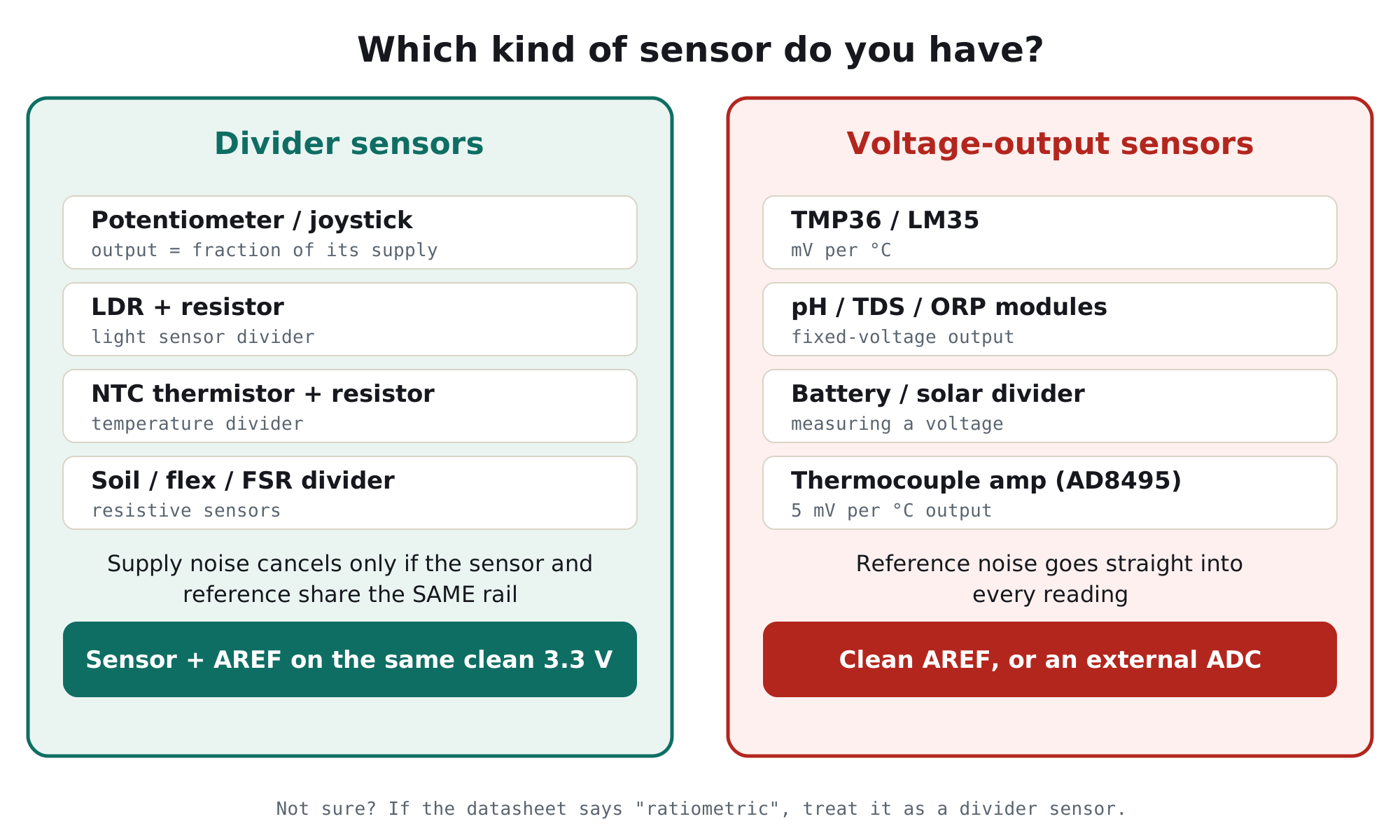
Does it affect your sensor? It depends on the type
Some sensors are dividers: their output is a fraction of their own supply (pots, LDRs, thermistors). If the sensor and the ADC reference share the same rail, supply noise mostly cancels. Others output a fixed voltage (TMP36, pH modules, a battery divider). For those, every bit of reference noise lands in the reading.
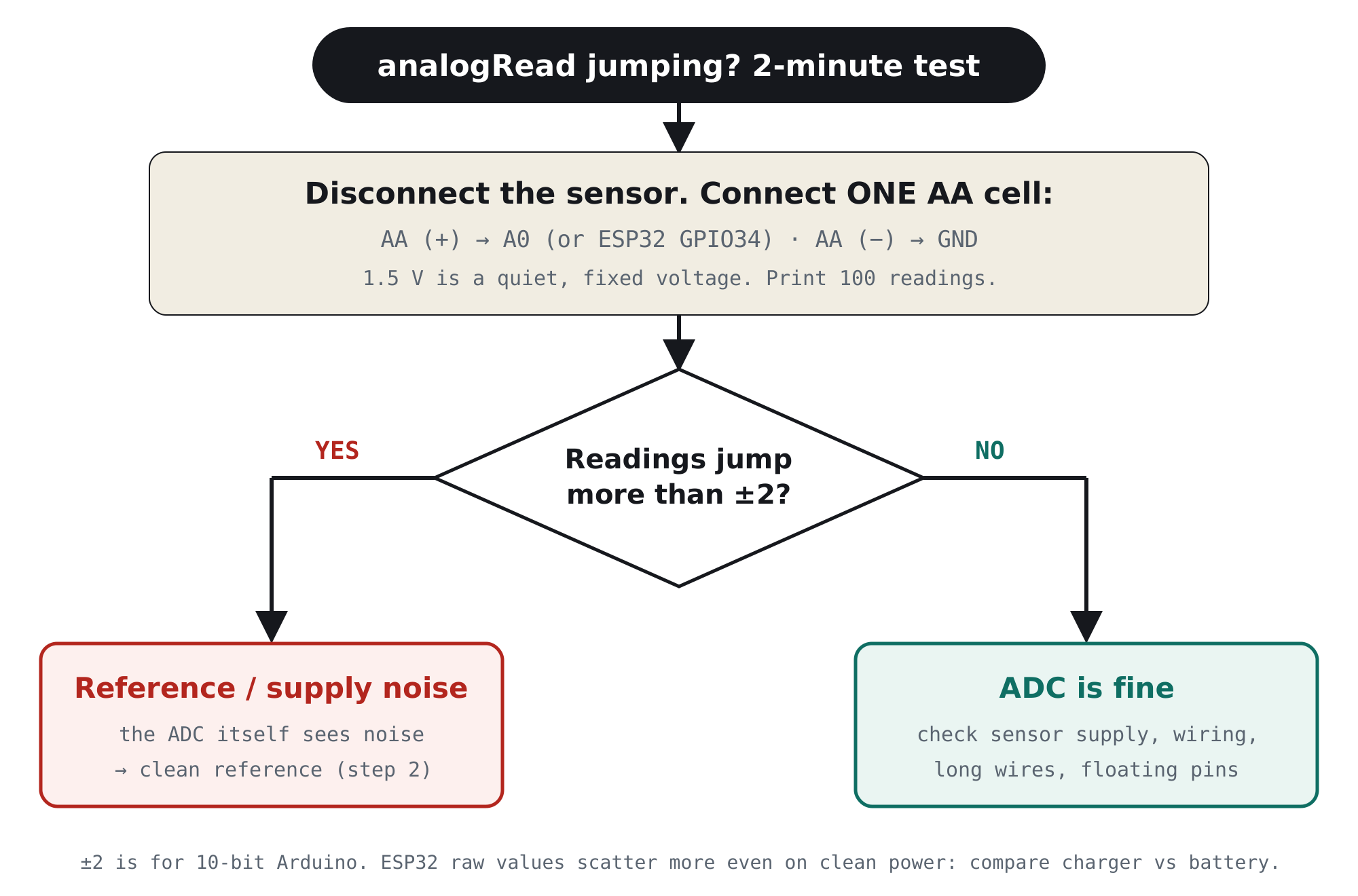
The 2-minute test: is it the ADC or the sensor?
Take the sensor out of the picture and give the ADC something perfectly steady to measure: a single AA cell. At about 1.5 V it’s inside the range of both Arduino and ESP32 inputs, and it’s electrically quiet.
// Print the spread of 100 readings
void loop() {
  int lo = 1023, hi = 0;
  for (int i = 0; i < 100; i++) {
    int v = analogRead(A0);
    lo = min(lo, v); hi = max(hi, v);
    delay(5);
  }
  Serial.print("min "); Serial.print(lo);
  Serial.print("  max "); Serial.println(hi);
}
The fix for Arduino Uno / Nano, in 3 steps
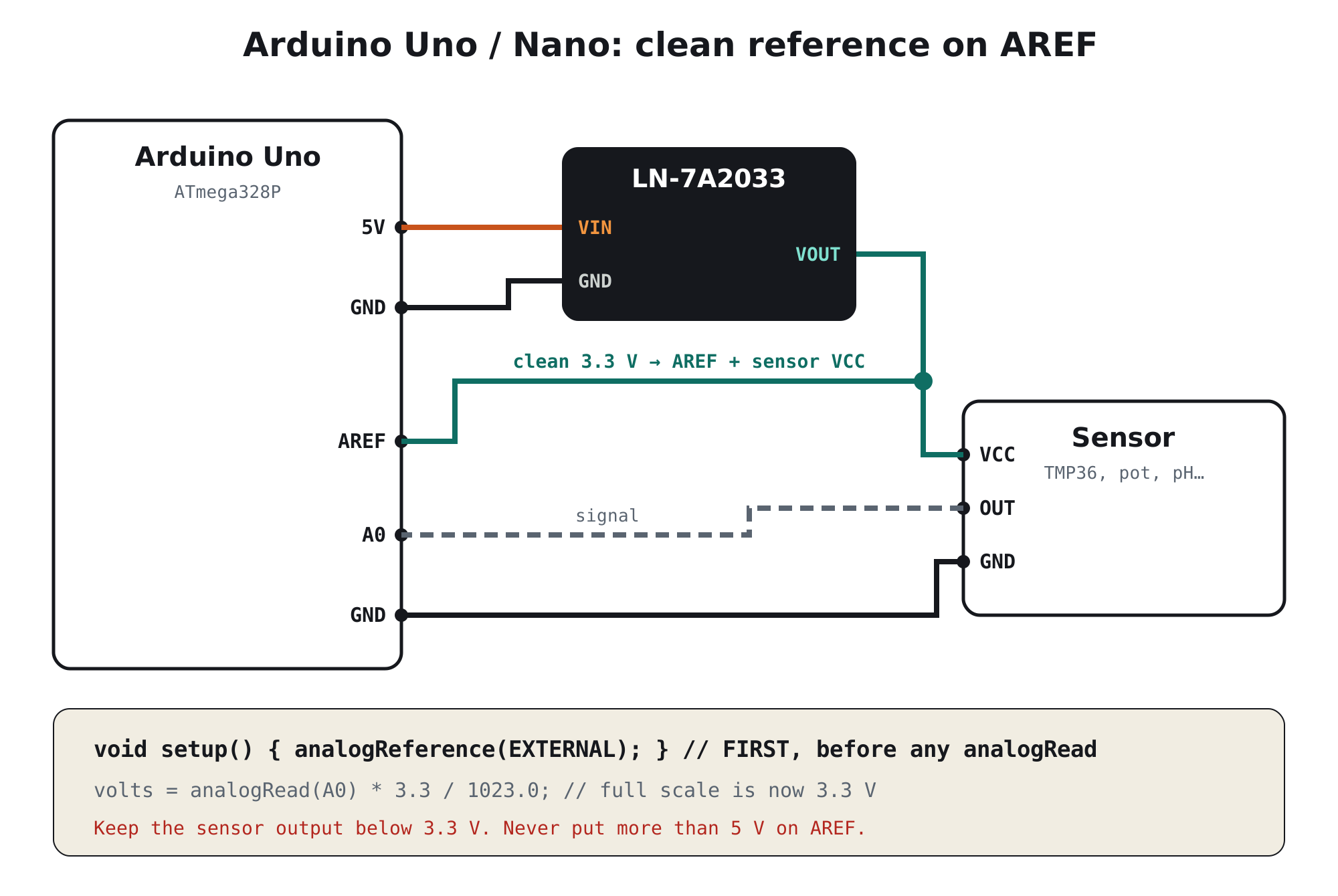
- Make a clean 3.3 VFeed a dedicated low-noise 3.3 V regulator from the Arduino’s 5 V pin. Its output becomes your quiet analog rail.
- Use it for AREF and the sensorConnect the clean 3.3 V to the
AREFpin and to the sensor’s VCC. Insetup(), callanalogReference(EXTERNAL)before anyanalogRead(). Readings now run from 0 to 3.3 V, so keep the sensor output below 3.3 V. - Add 100 nF and averagePut a 100 nF ceramic capacitor from the analog pin to GND, close to the board. Then average 8 to 16 readings in code. Together these remove what little noise is left.
const float VREF = 3.300;   // measure VOUT with a multimeter and put the real value here

void setup() {
  analogReference(EXTERNAL); // FIRST line: before any analogRead()
  Serial.begin(115200);
}

float readVolts(int pin) {
  analogRead(pin);                       // discard first reading after switching pins
  long sum = 0;
  for (int i = 0; i < 16; i++) sum += analogRead(pin);
  return (sum / 16.0) * VREF / 1023.0;
}

void loop() {
  Serial.println(readVolts(A0), 4);
  delay(200);
}analogRead() with something connected to AREF before you have called analogReference(EXTERNAL): the default setting connects AREF to the internal 5 V and the two sources fight each other, which can damage the chip. Make it the first line of setup().
Which board are you using?
| Your board | Default ADC reference | What to do |
|---|---|---|
| Arduino Uno R3 / Nano / Pro Mini 5 V | Board’s 5 V (usually USB) | Clean 3.3 V to AREF + sensor, analogReference(EXTERNAL) |
| Arduino Mega 2560 | Board’s 5 V | Same as Uno: AREF pin + EXTERNAL |
| ESP32 | Internal ≈1.1 V reference (no AREF pin) | See the ESP32 section: ADC1 pins, 100 nF, averaging, clean sensor supply |
| Raspberry Pi Pico | ADC_VREF pin, fed from the 3.3 V rail via a filter | Power sensors from a clean 3.3 V; for precision, use an external ADC |
| Any board, precision needed | – | ADS1115 (16-bit) powered from a clean 3.3 V rail |
Using an ESP32? Read this first
The ESP32’s built-in ADC has no external reference pin, so the AREF trick doesn’t apply. Its readings are also noisy and slightly non-linear even on perfect power. A clean supply still helps: it removes Wi-Fi burst noise from the sensor and the board’s ground. But it works best together with these settings:
| Do this | Why |
|---|---|
| Use ADC1 pins (GPIO32–39; on most boards 32, 33, 34, 35, 36, 39) | ADC2 pins don’t work while Wi-Fi is running |
Use analogReadMilliVolts() | Applies the chip’s factory calibration |
| Keep the input below ≈2.45 V | Espressif’s recommended range at the default 11 dB setting; readings get non-linear above it |
| Add 100 nF from the pin to GND | Espressif’s own recommendation for reducing noise |
| Average 16–64 samples | Also recommended by Espressif (“multisampling”) |
| Power the sensor from a clean 3.3 V, not the ESP32’s 3V3 pin | The on-board regulator also feeds Wi-Fi transmit bursts |
| Need real precision? Use an ADS1115 on a clean 3.3 V | 16-bit, its own internal reference, I²C. The ESP32 just reads the result |
The clean analog rail we designed for this
TrueVolt LN-7A2033 · Clean power for sensors, radios & audio
Feed it from 5 V. Use its 3.3 V for AREF, your sensors, or an ADS1115. Three pins, no code.
- 7 µVrms noise: hundreds of times below one Arduino ADC step (3.2 mV)
- 95 dB ripple rejection at 1 kHz blocks USB and charger noise
- 300 mA: powers several sensors plus an ADS1115
- Genuine TI TPS7A2033, Samsung capacitors, ferrite filtering, aluminium PCB
- Reverse-polarity and reverse-current protection. Designed & made in Pune, India
Still jumping? The other common causes
If the AA-cell test was steady but your real sensor still jumps, the problem is between the sensor and the pin:
| Cause | What you notice | Fix |
|---|---|---|
| Floating input | Random values, changes when you touch the wire | Make sure the sensor is really connected; unused inputs read garbage |
| High-impedance source (above ~10 kΩ) | Readings lag, or one channel affects the next | Add 100 nF at the pin; read twice and discard the first |
| Long, unshielded sensor wires | Noise grows with cable length or near motors | Twisted pair or shielded cable, 100 nF at the board |
| Motor or LED-strip current in the sensor’s ground | Jumps when the load switches | Separate ground wires that join at one point |
| The sensor itself is noisy or drifting | Steady on the AA test, noisy on the sensor | Check the sensor’s datasheet; pH probes need time and calibration |
For engineers: reference noise in numbers
1. One ADC step is smaller than you think
| Converter and reference | Resolution | One step (LSB) |
|---|---|---|
| Arduino Uno, 5 V reference | 10-bit | ≈4.9 mV |
| Arduino Uno, 3.3 V on AREF | 10-bit | ≈3.2 mV |
| ESP32, 0–2.45 V usable | 12-bit (fewer effective bits) | ≈0.6 mV nominal |
| ADS1115, ±2.048 V range | 16-bit | 62.5 µV |
A USB port may legally sit anywhere from about 4.75 to 5.25 V, and phone chargers add ripple and switching spikes on top. A few tens of millivolts of movement on a 5 V reference is several LSBs on an Uno, and far more on a 16-bit converter. That’s why the reference must be quieter than the step you want to resolve.
2. Divider sensors cancel noise, but only on one rail
For a pot or thermistor divider, Vin = Vsupply × k. If the reference is the same supply, the reading is k × 1023 and the supply drops out of the equation. That only works if the sensor and the reference really share one node. Separate rails, long wires or ground currents break the cancellation. Voltage-output sensors never cancel: reading = Vsensor ÷ Vref × 1023, so a 1% reference error is a 1% reading error.
3. Why the TPS7A2033 suits a reference rail
| Parameter (TI datasheet) | Value | Why it matters here |
|---|---|---|
| Output noise | 7 µVrms (10 Hz–100 kHz) | About 1/450 of one Uno LSB at 3.3 V; even small next to an ADS1115 step |
| PSRR | 95 dB at 1 kHz | Blocks USB and charger ripple from the 5 V side |
| Dropout | 140 mV at 300 mA | Keeps regulating even when USB sags |
| Output current | 300 mA | AREF plus several sensors and an external ADC |
A low-noise LDO is a quiet reference, not a precision one. For absolute accuracy, measure the actual output with a good multimeter and use that number in your code (the VREF constant above). For lab-grade accuracy over temperature, use a dedicated voltage-reference IC.
Frequently asked questions
Why are my analogRead values fluctuating?
Usually because the ADC’s reference is noisy. On an Arduino Uno or Nano, analogRead measures the input as a fraction of the board’s 5 V, which comes from USB or a charger and carries ripple. Other causes are a floating input, long sensor wires and motor currents in the ground. Test with a single AA cell on the input: if that also jumps, fix the reference.
How do I stop analogRead from jumping on Arduino?
Power the sensor and the AREF pin from a clean 3.3 V regulator, call analogReference(EXTERNAL) at the start of setup(), add a 100 nF capacitor from the analog pin to GND, and average 8 to 16 readings.
What should I connect to the AREF pin?
A clean, stable voltage between about 1 V and 5 V, for example the output of a low-noise 3.3 V regulator. Set analogReference(EXTERNAL) before any analogRead, never exceed 5 V, and keep your sensor’s output below the AREF voltage.
Why is the ESP32 ADC so noisy?
The ESP32’s ADC has noticeable noise and non-linearity of its own, and Wi-Fi transmit bursts add more through the supply and ground. Use ADC1 pins, analogReadMilliVolts(), a 100 nF capacitor and multisampling, and power the sensor from a clean 3.3 V. For precise measurements, use an external ADC such as the ADS1115.
Can I use ADC2 pins on the ESP32 with Wi-Fi?
No. ADC2 is shared with the Wi-Fi driver, and reads fail while Wi-Fi is running. Use ADC1 pins (GPIO32–39) for analog inputs in Wi-Fi projects.
Does averaging fix ADC noise?
Averaging reduces random noise, roughly by the square root of the number of samples. It does not remove slow drift, offset, ripple at a steady frequency or a noisy reference that moves slowly. Fix the reference first, then average.
What is the best power supply for accurate analog readings?
A dedicated low-noise 3.3 V linear regulator, fed from 5 V and used only for the sensors and the ADC reference. For example, the Ramanu TrueVolt LN-7A2033 (TI TPS7A2033, 7 µVrms, 95 dB PSRR at 1 kHz, 300 mA) gives an Arduino AREF, an ADS1115 or a set of sensors a quiet 3.3 V rail.
Fix it today
Give your ADC a reference it can trust
One small module between your 5 V and your sensors: quiet 3.3 V, genuine TI, made in India. Cheaper than one failed demo.