Troubleshooting · Audio · PCM5102 / PCM5102A · ESP32 I2S · Raspberry Pi
PCM5102 DAC Hiss or Whine? Fix ESP32 I2S Audio Noise
PCM5102 noise driving you mad? You paused the music, and the speaker still plays
That isn’t the DAC being cheap. Most of the time you are hearing its power supply.
Ramanu Systems · Pune, India · 3-minute answer, 10-minute deep dive
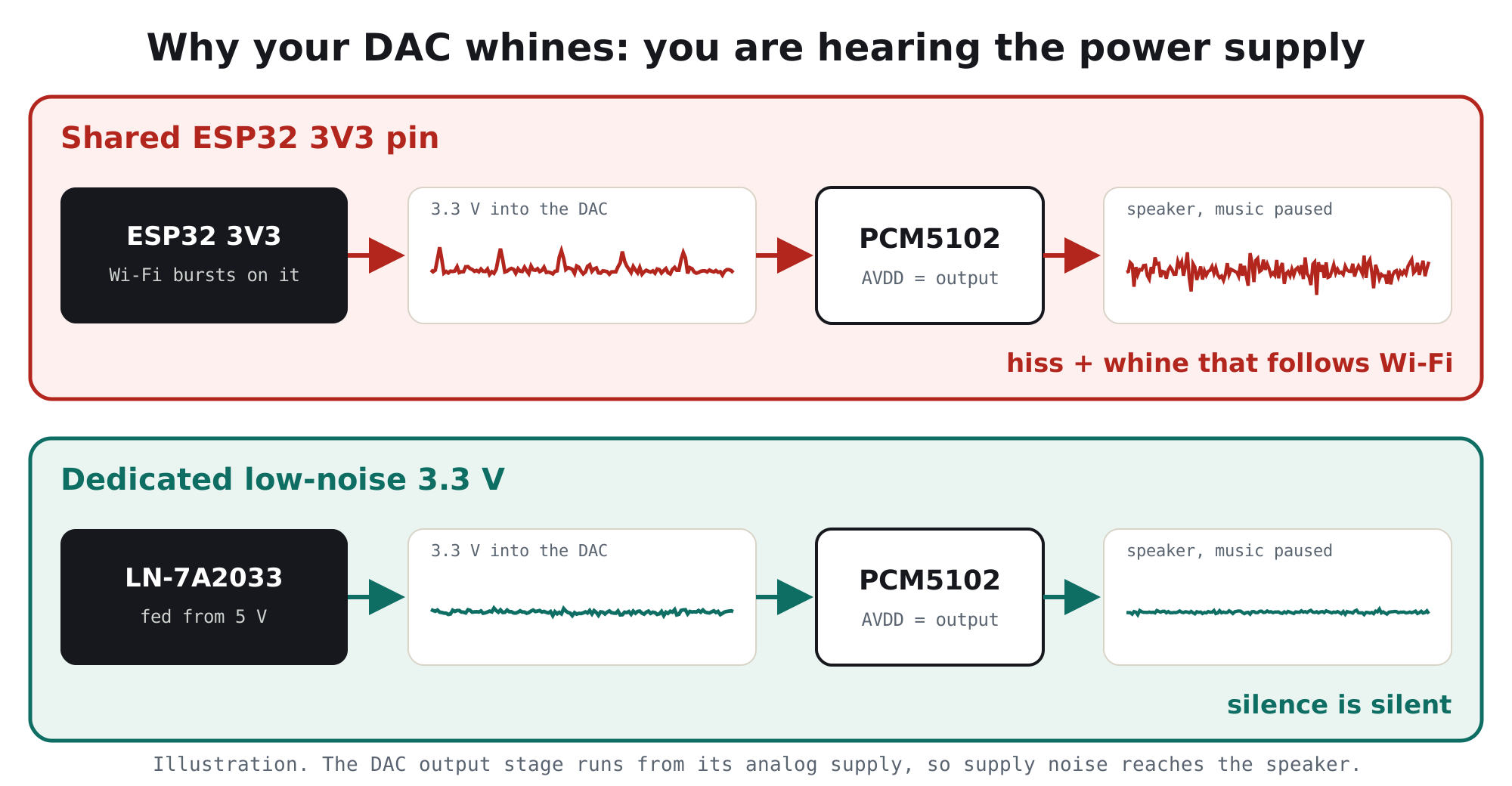
The PCM5102’s analog output runs straight from its 3.3 V supply. In most projects that supply is the ESP32’s 3V3 pin, which also feeds Wi-Fi transmit bursts. The bursts ride on the rail, the DAC passes a little of them to the output, and the amplifier makes them loud.
Fix: give the DAC its own clean, low-noise 3.3 V, join all grounds at one point, and power the speaker amplifier separately.
Is this your problem?
If two or more of these sound familiar, the DAC’s power supply is your prime suspect:
- Hiss you can hear when the music is paused
- A whine or chirp that changes with Wi-Fi activity
- Buzz on a phone charger or laptop USB, quieter on battery
- Clicks or ticks while streaming internet radio
- Noise gets worse as you turn the amplifier up
- Noise changes when you touch or move the wires
Why it happens, in one picture
An ESP32 pulls short, heavy bursts of current every time Wi-Fi transmits. Those bursts show up as dips and spikes on its 3V3 pin. If the PCM5102 board is powered from that same pin, its analog section sees every burst. A little of that leaks to the audio output, and your amplifier turns it into an audible whine.
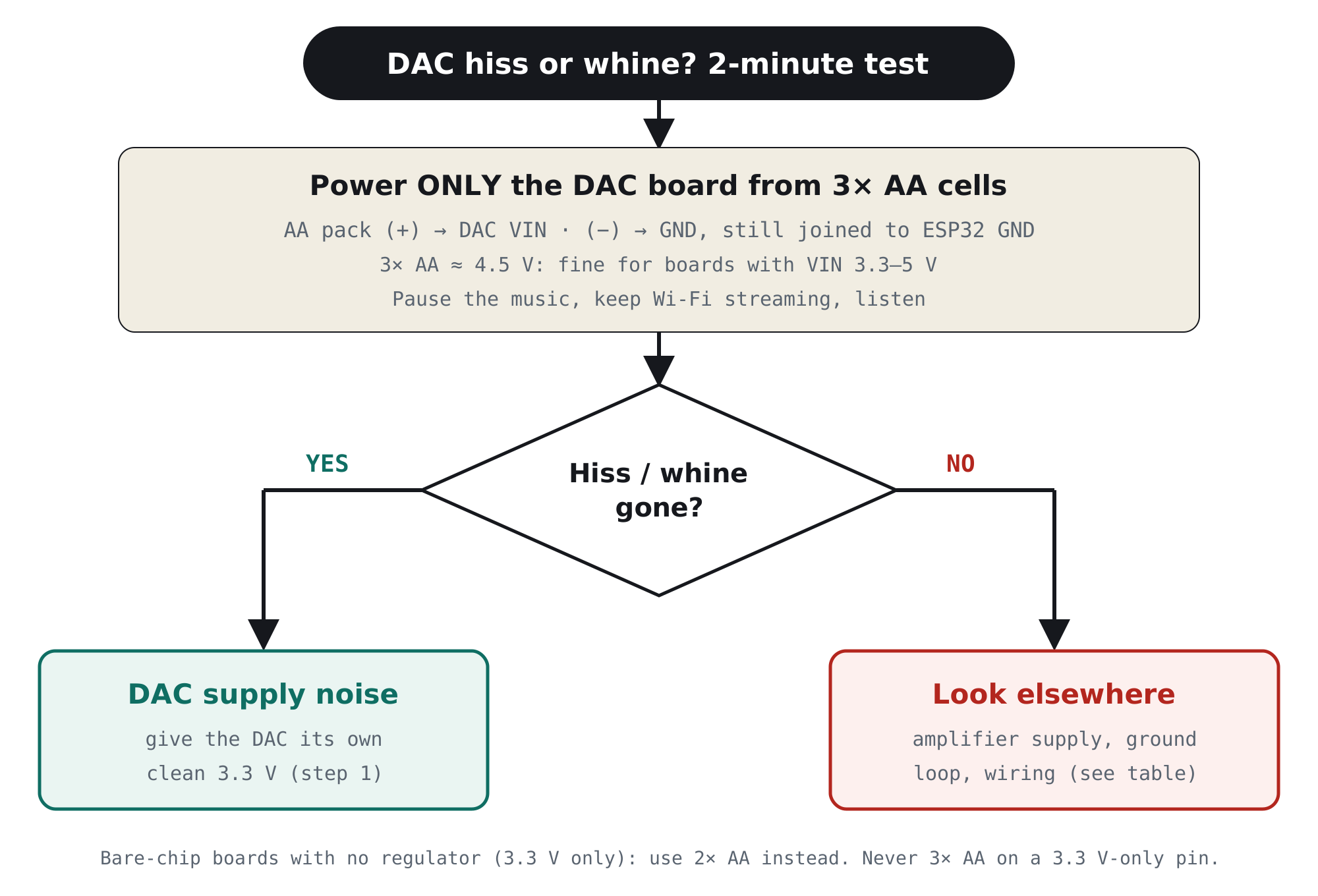
The 2-minute test: is the supply really the problem?
Batteries are electrically quiet, so they make the perfect reference. Power only the DAC board from AA cells and listen.
The fix in 3 steps
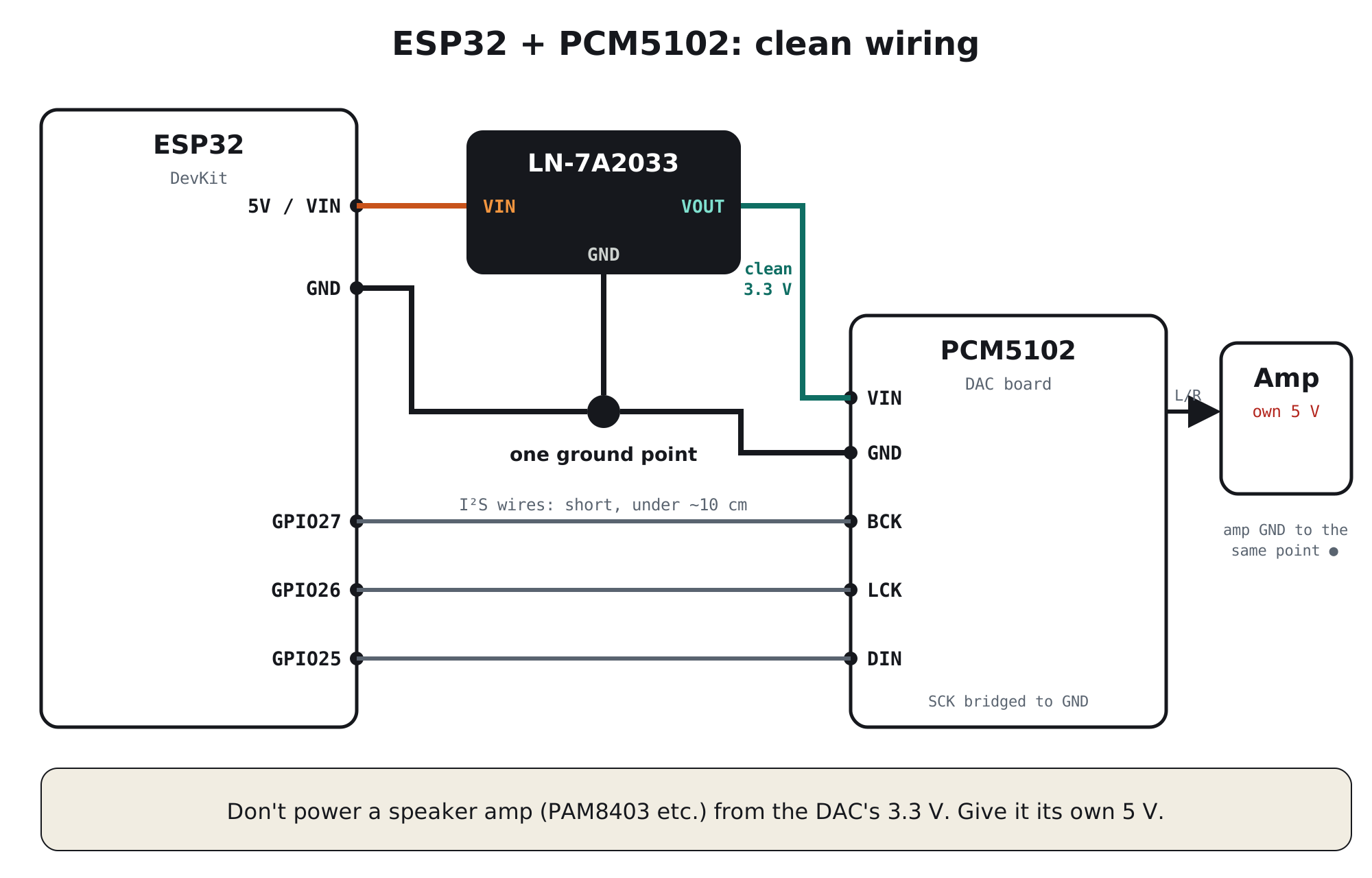
- Give the DAC its own clean 3.3 VFeed a dedicated low-noise 3.3 V regulator from the ESP32’s 5 V pin (or your 5 V supply), and power only the DAC board from it. Don’t take the DAC’s supply from the ESP32’s 3V3 pin.
- Join all grounds at one pointRun the ESP32, regulator and DAC grounds to one spot, and bring the amplifier’s ground there too. This keeps the amplifier’s and Wi-Fi’s return currents out of the DAC’s ground.
- Keep the amplifier on its own supply, and wires shortClass-D amplifiers such as the PAM8403 pull large current pulses: give them their own 5 V, never the DAC’s 3.3 V. Keep the three I²S wires under about 10 cm, and run audio wires away from power and speaker wires.
#include "Audio.h"          // ESP32-audioI2S library
Audio audio;

void setup() {
  // ... connect to Wi-Fi first ...
  audio.setPinout(27, 26, 25);   // BCK, LCK (LRC), DIN (DOUT)
  audio.setVolume(15);           // 0..21: leave headroom, avoid clipping
  audio.connecttohost("http://your-stream-url");
}

void loop() { audio.loop(); }
Board jumper settings (back of the purple PCM5102 board)
| Pad / pin | Set to | What it does |
|---|---|---|
| SCK | Bridge to GND | No master clock needed; the DAC’s internal PLL runs from BCK |
| H1L · FLT | Low | Normal-latency digital filter |
| H2L · DEMP | Low | De-emphasis off |
| H3L · XSMT | High | Un-muted. If this floats, you may get no sound |
| H4L · FMT | Low | Standard I²S format |
Which setup are you using?
| Your setup | What to do |
|---|---|
| ESP32 internet radio / Bluetooth speaker | Clean 3.3 V for the DAC from the 5 V pin; amplifier on its own 5 V; one ground point |
| DAC straight into headphones | No amplifier to blame, so any hiss you hear is the DAC or its supply. The clean rail matters most here |
| Raspberry Pi + PCM5102 | The Pi’s 3.3 V comes from a switching regulator. Feed the DAC from a low-noise regulator on the Pi’s 5 V pin |
| Powered from a phone charger | The charger adds ripple too. The clean regulator blocks most of it; also try a different charger to compare |
The clean audio supply we designed for this
TrueVolt LN-7A2033 · Clean power for sensors, radios & audio
Sits between your 5 V and the DAC. Three pins, no code.
- 7 µVrms noise, 95 dB ripple rejection at 1 kHz (genuine TI TPS7A2033)
- 300 mA: plenty for a DAC board, which draws a few tens of mA
- Ferrite filtering, Samsung capacitors, aluminium PCB
- Reverse-polarity and reverse-current protection
- Designed & made in Pune, India
Still noisy? The other common causes
If the battery test didn’t silence it, work through this list:
| Cause | What you hear | Fix |
|---|---|---|
| Ground loop (amplifier or PC on mains) | Steady 50 Hz / 100 Hz hum | Isolate: ground-loop isolator, battery-powered amp, or one shared supply |
| Amplifier’s own noise (cheap class-D) | Hiss even with the DAC input shorted | Lower amp gain, better amplifier, or a quieter supply for the amp |
| Streaming buffer underruns | Clicks and dropouts on weak Wi-Fi | Better signal, lower bitrate stream, bigger buffer |
| Digital volume set too high | Harsh crackle on loud passages | Turn the software volume down, the amplifier up |
| Long I²S wires | Random crackle, noise near the ESP32 | Keep I²S wires short; add a GND wire alongside |
| XSMT or SCK pads left open | No sound, or sound that cuts in and out | Set the jumpers as in the table above |
For engineers: why a 112 dB DAC needs a quiet rail
1. The noise floor is tiny
TI specifies the PCM5102A at about 112 dB dynamic range with a 2.1 Vrms full-scale output. That puts its own noise floor around 5 µVrms (2.1 V ÷ 10112/20). Now consider tens of millivolts of Wi-Fi burst noise on a shared 3V3 pin. Even if the chip rejected 99.9% of it (60 dB), the leftover would be tens of microvolts, several times the DAC’s own floor. That’s why the whine is audible.
2. What the datasheet says about the supply
| Pin (TI PCM5102A) | Requirement | Notes |
|---|---|---|
| AVDD | 3.3 V | Powers all the analog circuitry. TI notes many systems use a low-noise regulator for it |
| CPVDD | 3.3 V | Charge pump for the ground-centred output |
| DVDD | 3.3 V (or 1.8 V) | Digital supply and I/O level |
| XSMT | ≤ DVDD + 0.3 V | TI warns supply noise can push it over the limit and damage the device |
The purple boards feed these pins from small on-board regulators. Those help with a 5 V input, but they are tiny general-purpose parts. When VIN is the ESP32’s own 3.3 V, they have almost no headroom left and pass most of the noise straight through. A clean 3.3 V at VIN fixes the problem at the source.
3. Why the TPS7A2033 suits this job
| Parameter (TI datasheet) | Value | Why it matters here |
|---|---|---|
| Output noise | 7 µVrms (10 Hz–100 kHz) | Close to the DAC’s own floor, then reduced further by the DAC’s supply rejection |
| PSRR | 95 dB at 1 kHz | Blocks USB and charger ripple in the audio band |
| Dropout | 140 mV at 300 mA | Keeps regulating when USB 5 V sags under load |
| Output current | 300 mA | Ample for the DAC board. Not for a speaker amplifier |
Frequently asked questions
Why does my PCM5102 DAC hiss or whine?
Usually because it shares a noisy 3.3 V supply with the ESP32, whose Wi-Fi transmit bursts ride on that rail. The DAC’s analog output runs from its supply, so the noise reaches the speaker. Power the DAC from its own low-noise 3.3 V regulator and join all grounds at one point.
Can I power the PCM5102 from the ESP32 3.3 V pin?
It will work, but it is the most common cause of hiss and Wi-Fi whine. For clean audio, feed the DAC board from a separate low-noise 3.3 V regulator powered from the 5 V pin.
Can the PCM5102 module run on 5 V?
The common purple PCM5102 boards accept 3.3–5 V on VIN because they have on-board regulators. The PCM5102A chip itself needs 3.3 V, so a bare chip or a board without regulators must never get 5 V.
Why do I hear a whine that changes with Wi-Fi?
Each Wi-Fi transmission pulls a burst of current from the ESP32’s supply. If the DAC shares that supply or its ground path, the bursts become an audible whine or chirp. A dedicated clean 3.3 V for the DAC and a single ground point stop it.
How do I remove 50 Hz hum from my ESP32 audio project?
Steady 50 or 100 Hz hum usually comes from a ground loop between mains-powered devices, such as the amplifier and a PC. Use a ground-loop isolator, run the amplifier from battery, or power everything from one supply. A better regulator alone won’t remove ground-loop hum.
Which PCM5102 jumpers do I need to solder?
On the purple board, bridge SCK to GND, set FLT low, DEMP low, XSMT high and FMT low for standard I²S. A floating XSMT can mute the output.
What is the best power supply for a PCM5102 DAC?
A dedicated low-noise 3.3 V linear regulator fed from 5 V, used only for the DAC. For example, the Ramanu TrueVolt LN-7A2033 (TI TPS7A2033, 7 µVrms, 95 dB PSRR at 1 kHz, 300 mA) gives a PCM5102 board a quiet supply. Power the speaker amplifier separately.
Fix it today
Make silence silent
One small module between your 5 V and the DAC: quiet 3.3 V, genuine TI, made in India. Cheaper than one failed demo.