Troubleshooting · Audio · MAX4466 · MAX9814 · ESP32 · WLED
Microphone Module Hiss or Random Spikes? Fix the Power First
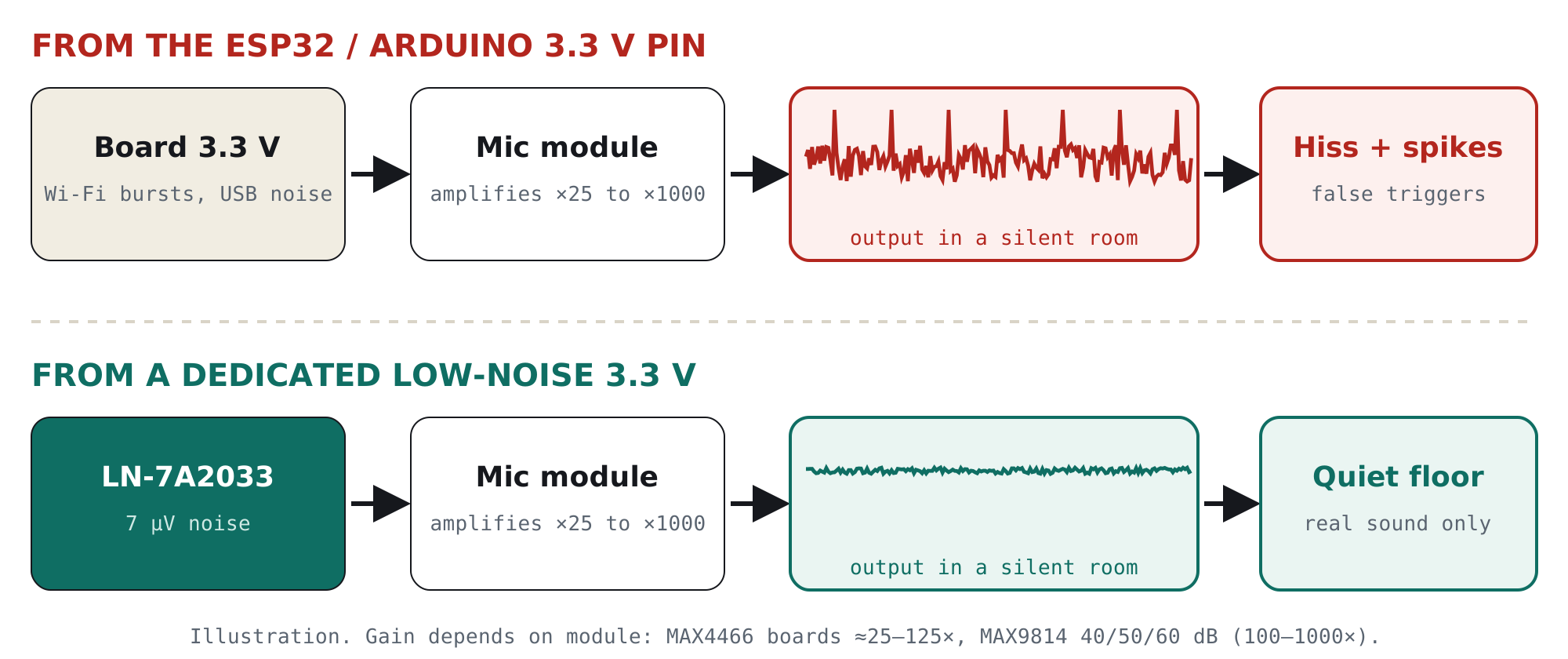
Microphone module hissing in a silent room? You’re probably seeing one of these:
Before you buy another mic or add more filtering in code, check what the module is amplifying: the noise on its 3.3 V supply.
Ramanu Systems · Pune, India · 3-minute answer, 10-minute deep dive
A microphone module is a high-gain amplifier: 25 to 1000 times, depending on the module and setting. Noise on its supply (ESP32 Wi-Fi bursts, USB charger ripple, LED strip switching) leaks into the microphone signal and gets amplified along with your voice.
Give the mic its own clean 3.3 V supply, use the right ADC pin, and set the gain no higher than you need.
Is this your problem?
If two or more of these sound familiar, the power supply is your prime suspect:
- Steady hiss even in a quiet room
- Spikes or clicks at regular intervals
- Worse when ESP32 Wi-Fi is on
- Sound-reactive LEDs flicker with no sound
- Changes when you swap the USB charger
- Quieter when everything runs on batteries
Why it happens, in one picture
An electret microphone produces only a few millivolts. The module amplifies that 25 to 1000 times so your board can read it. The microphone is biased from the supply, so any noise on the supply enters at the same point as the sound and is amplified just as much.
The 2-minute test: is power really the problem?
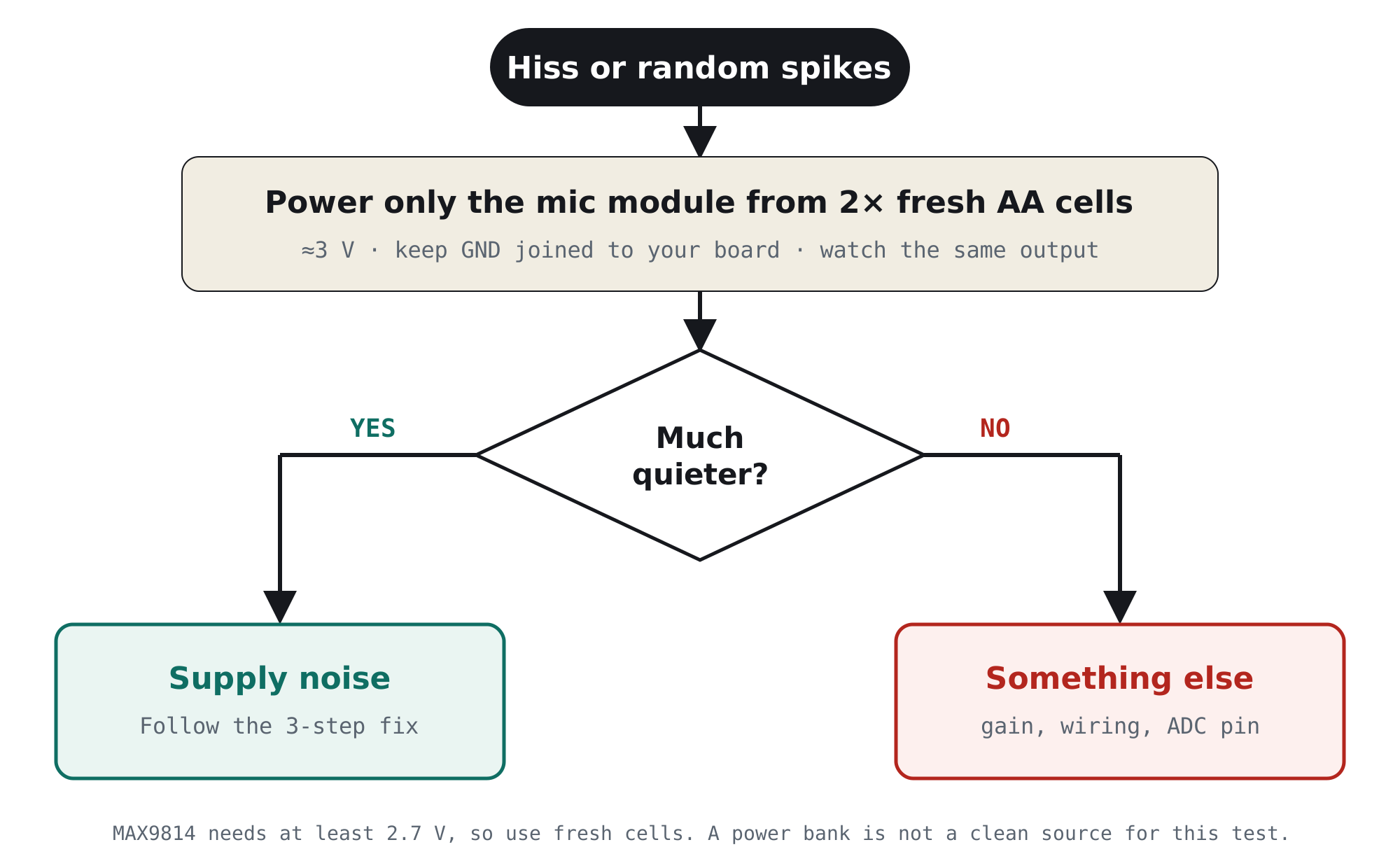
Run the mic from two fresh AA cells for a minute and watch the same output (Serial Plotter, LED effect or FFT). Batteries are electrically quiet, so they make a clean reference.
The fix in 3 steps
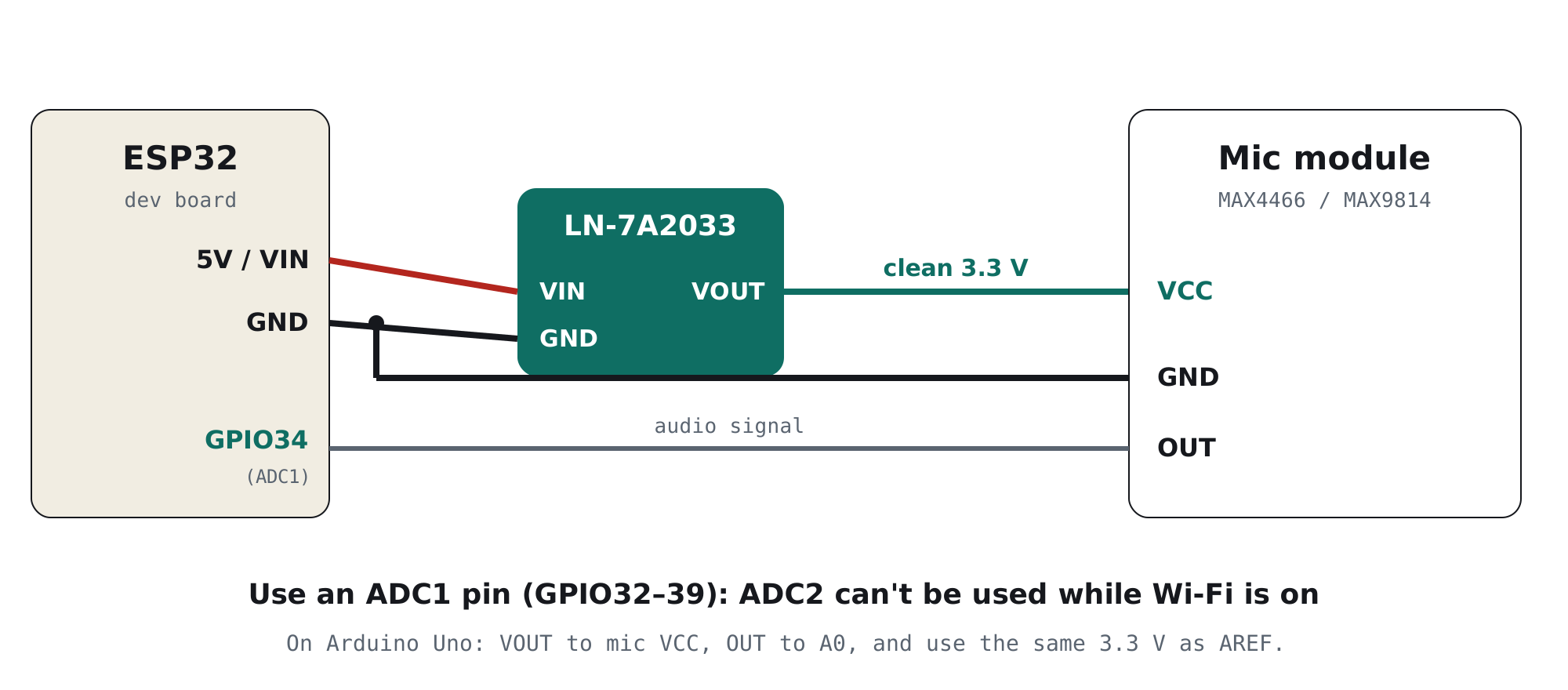
- Give the mic its own clean 3.3 VPower the mic module from a dedicated low-noise 3.3 V regulator fed from 5 V, not from the board’s 3.3 V pin that the Wi-Fi radio or LED strip also uses.
- Use the right ADC pinOn the ESP32, connect OUT to an ADC1 pin (GPIO32–39). ADC2 pins can’t be read while Wi-Fi is on.
- Set the gain no higher than you needMAX9814: tie GAIN to VDD for 40 dB (leaving it unconnected gives 60 dB). MAX4466: turn the gain trimmer down until loud sounds just reach full scale.
Which board are you using?
| Your setup | What to do |
|---|---|
| ESP32 (WLED, FFT, voice) | Clean 3.3 V to the mic, OUT to an ADC1 pin. Keep the LED strip on its own 5 V supply. |
| Arduino Uno / Nano | Clean 3.3 V to the mic and to AREF. Call analogReference(EXTERNAL) before connecting AREF, then read OUT on A0. |
| Raspberry Pi Pico | Clean 3.3 V to the mic; its on-board switching regulator is noisy, so a separate rail helps. |
The clean supply we designed for this
TrueVolt LN-7A2033 · Clean power for sensors, radios & audio
Sits between your 5 V and the mic module, and gives it a quiet, steady 3.3 V away from Wi-Fi and LED noise.
- 7 µVrms output noise: far below what the mic can hear
- 95 dB ripple rejection at 1 kHz, right in the audio band
- Genuine TI TPS7A2033, ferrite filtering, Samsung 1206 capacitors
- Reverse-polarity and reverse-current protection
- 3 pins, breadboard-ready. Designed & made in Pune, India
Still noisy? The other common causes
Power is the most common cause, but not the only one. If the AA-cell test pointed elsewhere, check these:
| Cause | What you notice | Fix |
|---|---|---|
| Gain too high | Loud hiss, clips on normal speech | MAX9814 at 40 dB; turn the MAX4466 trimmer down |
| ADC2 pin with Wi-Fi on (ESP32) | Readings stuck, max or garbage | Move OUT to GPIO32–39 |
| LED strip on the same supply | Noise rises with LED brightness | Separate 5 V supply for the strip, grounds joined at one point |
| Long, unshielded signal wire | Hum, noise when touching the wire | Keep OUT short; shielded cable for long runs |
| Mic near the ESP32 antenna | Clicks synced with Wi-Fi traffic | Move the mic a few centimetres away from the antenna |
| Real background sound | Noise even on batteries | Fans, AC and fridges are real sound; use a noise-gate or squelch setting |
For engineers: how supply noise becomes audio
1. The gain is the multiplier
| Module | Gain | As a multiplier |
|---|---|---|
| MAX4466 breakout (typical) | Adjustable by trimmer | ≈25× to 125× |
| MAX9814, GAIN to VDD | 40 dB | 100× |
| MAX9814, GAIN to GND | 50 dB | ≈316× |
| MAX9814, GAIN unconnected | 60 dB | 1000× |
Whatever reaches the amplifier input along with the microphone signal is multiplied by these numbers. At 60 dB, 100 µV of noise at the input becomes 100 mV at the output, a large fraction of a 3.3 V ADC’s range.
2. Where supply noise gets in
- Microphone bias. An electret capsule is powered through a bias resistor. On typical MAX4466 breakouts that resistor connects to VCC, so supply ripple appears directly at the amplifier input. The op-amp’s own supply rejection doesn’t help here, because the noise arrives as signal.
- Output midpoint. The output idles at a mid-supply bias. If that bias is derived from VCC, supply noise shifts the “silence” level the ADC sees.
- AGC in silence (MAX9814). Its internal 2 V mic bias rejects supply noise better, but in a quiet room the AGC raises gain to the maximum, so any noise that does get through is shown at full gain.
- ADC reference. On an Arduino using the default 5 V reference, supply noise also moves the measurement scale itself.
3. Why the TPS7A2033 suits audio
| Parameter (TI datasheet) | Value | Why it matters here |
|---|---|---|
| Output noise | 7 µVrms (10 Hz–100 kHz) | Covers the whole audio band. Even at 1000× gain that’s about 7 mV at the output, a few ADC counts. |
| PSRR | 95 dB at 1 kHz | Rejects USB and charger ripple right where speech and music live. |
| PSRR at high frequency | 40 dB at 1 MHz | Plus the module’s ferrite filtering for switching hash. |
| Current | Mic modules draw a few mA | Huge headroom; the regulator runs cold. |
Frequently asked questions
Why does my microphone module hiss?
Most often, the module is amplifying noise from its power supply. Microphone modules have gains of 25 to 1000 times, and noise from ESP32 Wi-Fi, USB chargers or LED strips enters through the microphone bias. Power the mic from a dedicated low-noise 3.3 V regulator and reduce the gain to what you need.
Why does my MAX4466 show random spikes on the ESP32?
Spikes at regular intervals usually come from ESP32 Wi-Fi transmit bursts disturbing the shared 3.3 V rail. Give the MAX4466 its own clean 3.3 V supply, connect OUT to an ADC1 pin (GPIO32–39), and keep the mic away from the antenna.
What gain should I use on the MAX9814?
Start at 40 dB by tying the GAIN pin to VDD. The default when GAIN is unconnected is 60 dB, which amplifies background and supply noise 1000 times and usually causes hiss in quiet rooms.
Should I power the microphone module from 3.3 V or 5 V?
Use 3.3 V when your ADC runs at 3.3 V (ESP32, Pico) so the output stays within range. What matters most is that the 3.3 V is clean and not shared with Wi-Fi radios or LED strips.
Why do my sound-reactive LEDs flicker when it’s silent?
The mic is picking up supply noise, often from the LED strip itself or the ESP32’s Wi-Fi. Put the strip on its own 5 V supply, give the mic a clean 3.3 V rail, lower the gain, and raise the squelch or noise-gate setting.
Is a digital I²S microphone better than a MAX4466?
For new ESP32 projects, a digital I²S mic such as the INMP441 avoids analog noise pickup. For existing analog builds, a clean power supply is the most effective fix.
What power supply should I use for a microphone module?
A dedicated low-noise 3.3 V linear regulator fed from 5 V, not a shared board pin or switching supply. For example, the Ramanu TrueVolt LN-7A2033 (TI TPS7A2033, 7 µVrms, 95 dB PSRR at 1 kHz) gives MAX4466 and MAX9814 modules a quiet supply.
Fix it today
Hear the sound, not the supply
One small module between your 5 V and your mic: genuine TI, 7 µV noise, made in India. Cheaper than one failed demo.