Troubleshooting · 2.4 GHz radio · NRF24L01 · NRF24L01+PA+LNA
NRF24L01 Not Working or Dropping Packets? Fix the Power First
NRF24L01 not working? Your serial monitor keeps saying
Or it works on the desk and dies across the room. Before you swap modules or rewrite the code, check what the Arduino forum regulars check first: the 3.3 V supply.
Ramanu Systems · Pune, India · 3-minute answer, 10-minute deep dive
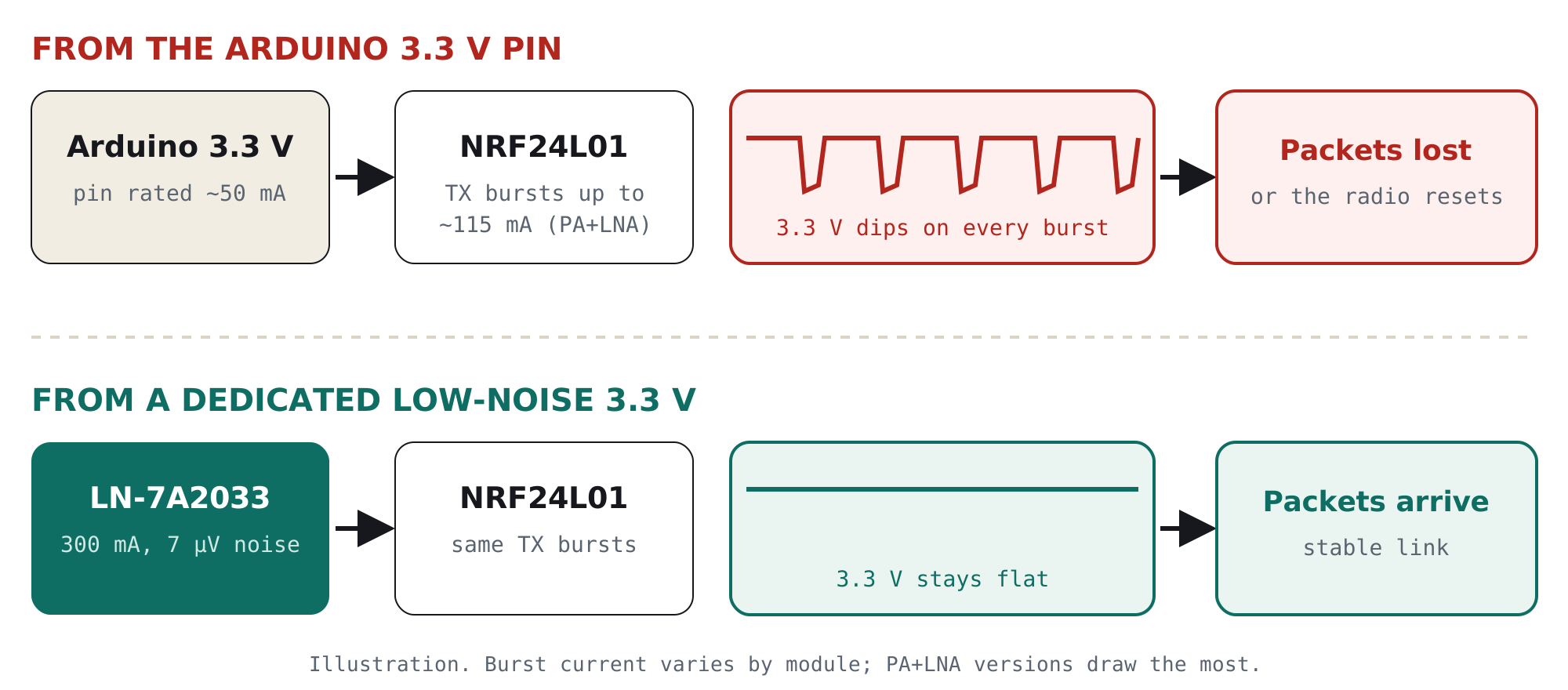
Most NRF24L01 problems come from the 3.3 V pin on the Arduino. It is rated for only about 50 mA, and the radio pulls sharp current bursts every time it transmits; the PA+LNA version can pull over 100 mA. The rail dips, and packets are lost or the radio resets.
Give the radio its own clean 3.3 V supply with current to spare, plus a 10 µF capacitor at its pins.
Is this your problem?
If two or more of these sound familiar, the power supply is your prime suspect:
- “Radio hardware not responding” or the module isn’t detected
- It works sometimes, then stops after a while
- Many failed sends, or the receiver misses packets
- Works on the desk, fails across the room
- The PA+LNA version is worse than the plain module
- It gets worse when a motor, servo or LED strip runs
Why it happens, in one picture
The NRF24L01 sits quietly most of the time, then pulls a burst of current each time it transmits. A weak supply can’t follow those bursts, so the 3.3 V rail dips at exactly the moment the radio needs it most. Noise riding on the rail also makes the receiver less sensitive, so range shrinks.
The 2-minute test: is power really the problem?
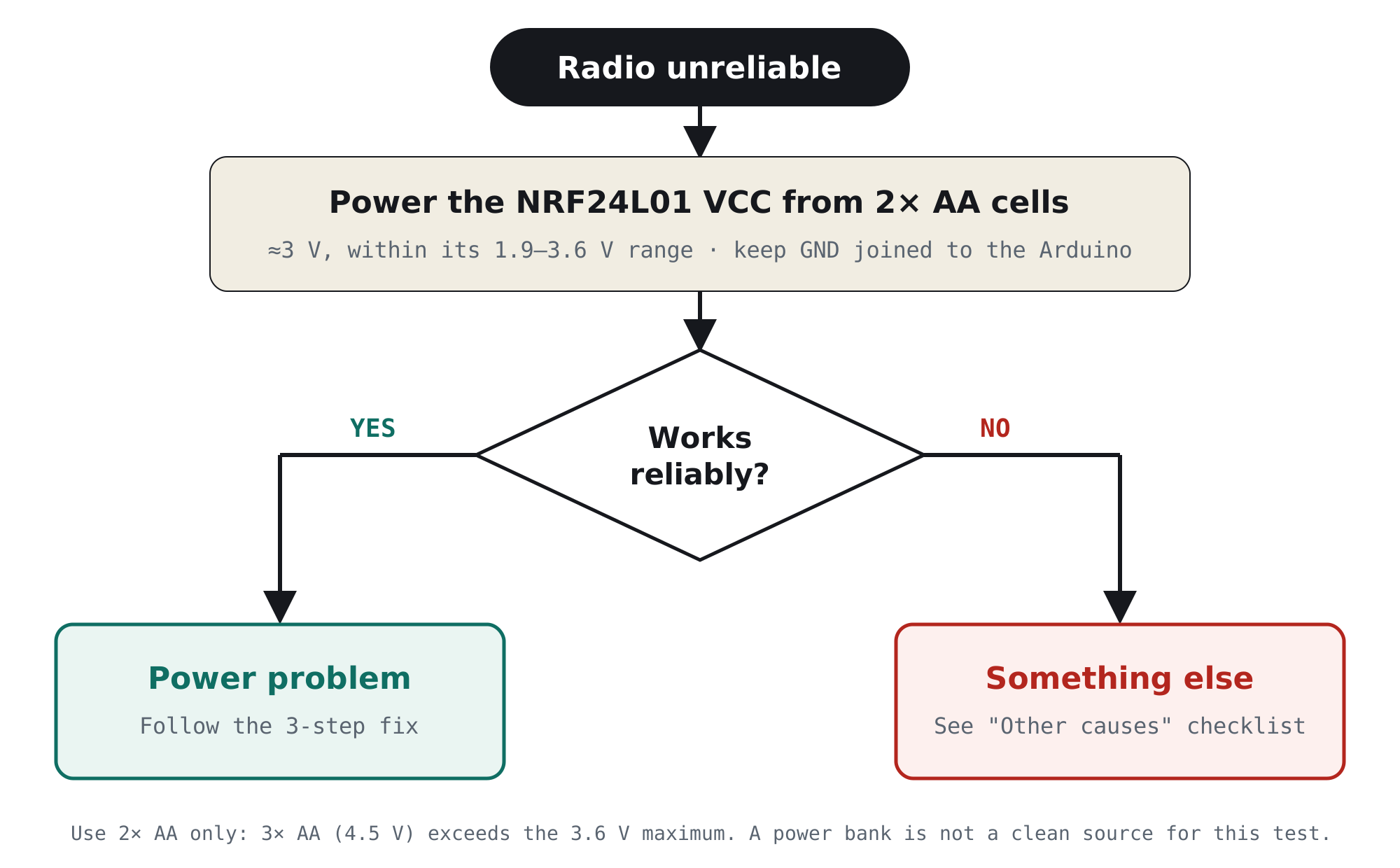
You don’t need an oscilloscope, just two AA cells. Batteries are electrically quiet and can deliver the burst current easily, so they make a clean reference.
The fix in 3 steps
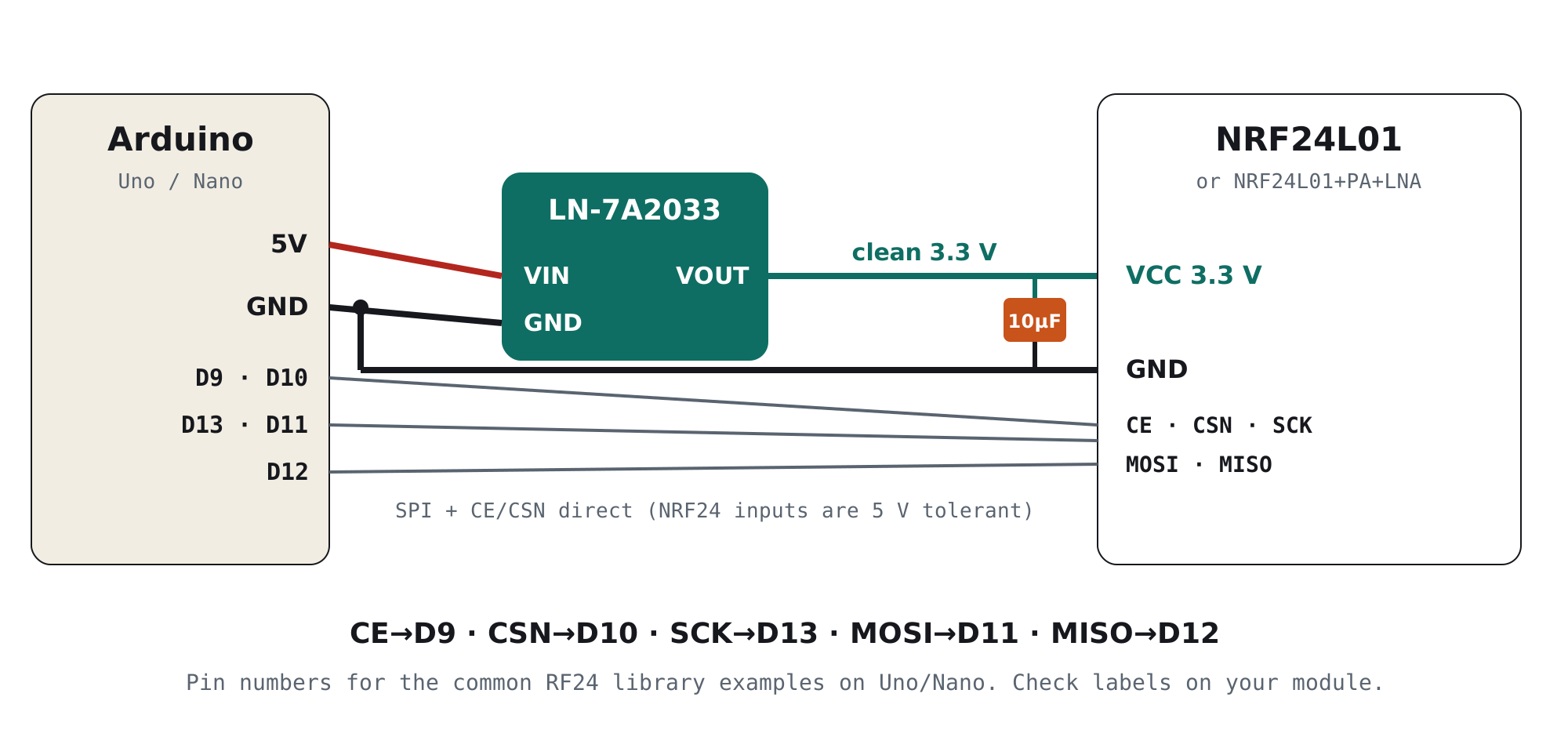
- Stop using the Arduino’s 3.3 V pinFeed the radio from a dedicated low-noise 3.3 V regulator powered from the Arduino’s 5 V pin (or your 5 V supply). It needs at least 150 mA of headroom for PA+LNA modules.
- Add 10 µF right at the radio’s pinsSolder a 10 µF capacitor (plus 100 nF if you have one) directly across the NRF24L01’s VCC and GND pins. It supplies the first microseconds of each burst before the regulator responds.
- Wire it as shown belowThe SPI, CE and CSN pins go straight to the Arduino. The NRF24L01’s inputs are 5 V tolerant, so no level shifter is needed on Uno or Nano.
Which board are you using?
| Your setup | What to do |
|---|---|
| Arduino Uno | Its 3.3 V pin is rated for only about 50 mA. Use a separate 3.3 V regulator from the 5 V pin. |
| Arduino Nano (clone) | On many clones the 3.3 V pin comes from the USB chip and supplies even less. Always use a separate regulator. |
| ESP32 / Pico | The on-board 3.3 V regulator is shared with Wi-Fi or the MCU and is noisy. A separate rail for the radio is still the most reliable option. |
| NRF24L01+PA+LNA (with antenna) | Highest current draw. A dedicated regulator is essential, not optional. |
The clean supply we designed for this
TrueVolt LN-7A2033 · Clean power for sensors, radios & audio
Sits between your 5 V and the radio, and supplies a quiet, steady 3.3 V with plenty of current to spare.
- 300 mA: easily covers NRF24L01+PA+LNA transmit bursts
- Genuine TI TPS7A2033, 7 µVrms noise, 95 dB ripple rejection at 1 kHz
- Samsung 10 µF 1206 capacitors and ferrite filtering on board
- Reverse-polarity and reverse-current protection
- 3 pins, breadboard-ready. Designed & made in Pune, India
Still failing? The other common causes
Power is the most common cause, but not the only one. If the AA-cell test pointed elsewhere, work through this list:
| Cause | What you notice | Fix |
|---|---|---|
| Wrong CE/CSN pins in code | “Not responding” even on batteries | Match RF24 radio(CE, CSN) to your wiring |
| Address, channel or data rate mismatch | Sends OK, receiver gets nothing | Use identical address, channel and data rate on both ends |
| PA+LNA modules too close together | Fails within 1 m, works further apart | Use setPALevel(RF24_PA_LOW) for bench tests |
| Data rate too high for the distance | Short range | setDataRate(RF24_250KBPS) gives the best sensitivity |
| Busy Wi-Fi channel | Random dropouts | Try a channel above 100 (above most Wi-Fi) |
| Loose jumper wires | Works when you press on the wires | Short wires, or a socket adapter for the module |
| Clone chip (e.g. Si24R1) | Some features behave differently | Try a module from a different seller |
For engineers: why the supply matters so much
1. The current profile is bursty
| Mode (nRF24L01+ datasheet, typical) | Supply current |
|---|---|
| Power down | ≈900 nA |
| Standby-I | ≈26 µA |
| TX at 0 dBm | ≈11.3 mA |
| RX at 2 Mbps | ≈13.5 mA |
| PA+LNA module, transmitting | commonly 100 mA or more (depends on the PA chip) |
The radio switches between microamps and tens or hundreds of milliamps in microseconds. A regulator with little current headroom, or long thin wires with real inductance, can’t follow that step. The rail sags, and if it drops near the chip’s 1.9 V minimum, the radio misbehaves or resets.
2. Why a capacitor alone often isn’t enough
The popular fix, a 10–100 µF capacitor across VCC, genuinely helps, because it supplies the first part of each burst. But it can’t fix a source that is current-limited or noisy:
- Current limit: if the source can only deliver ~50 mA, repeated transmits and retries drain the capacitor faster than the source can refill it.
- Noise: a capacitor does little against low-frequency ripple and the switching noise of a USB charger. That noise reaches the radio’s frequency synthesiser and low-noise amplifier and reduces receive sensitivity, which shows up as short range.
The robust answer is both: a regulator with real current headroom and low noise, plus a local capacitor at the module.
3. Why the TPS7A2033 suits this job
| Parameter (TI datasheet) | Value | Why it matters here |
|---|---|---|
| Output current | 300 mA | About 2–3× the burst current of a PA+LNA module |
| Output noise | 7 µVrms (10 Hz–100 kHz) | Keeps the synthesiser and LNA supply quiet |
| PSRR | 95 dB at 1 kHz, 40 dB at 1 MHz | Blocks USB and charger ripple from the 5 V side |
| Dropout | 140 mV at 300 mA | Keeps regulating even when a long USB cable sags the 5 V |
Dissipation is small: a 115 mA burst from 5 V to 3.3 V is about 0.2 W for a fraction of the time, and the module’s aluminium PCB spreads that heat easily.
Frequently asked questions
Why is my NRF24L01 not working?
The most common cause is an inadequate 3.3 V supply. The Arduino Uno’s 3.3 V pin is rated for only about 50 mA, and the radio pulls current bursts every time it transmits, so the rail dips and the radio fails or resets. Power it from a dedicated 3.3 V regulator with a 10 µF capacitor at its pins. If it still fails, check the CE/CSN pins, address, channel and data rate.
Can I power the NRF24L01 from the Arduino 3.3 V pin?
A plain NRF24L01 sometimes works from it, but unreliably. The PA+LNA version usually doesn’t work from it at all. A separate 3.3 V regulator powered from the 5 V pin is the reliable choice.
What capacitor should I use with the NRF24L01?
A 10 µF capacitor (electrolytic or ceramic) soldered directly across VCC and GND, ideally with a 100 nF ceramic in parallel. It helps with short bursts, but it cannot fix a supply that is current-limited or noisy.
Can the NRF24L01 run on 5 V?
No. VCC must be 1.9–3.6 V, and 5 V on VCC can destroy it. Its signal inputs (CE, CSN, SCK, MOSI) are 5 V tolerant, so they can connect directly to an Arduino Uno or Nano.
Why does my NRF24L01 work close by but not at longer range?
Supply noise and voltage dips reduce receive sensitivity and transmit power, which shortens range. Also try setDataRate(RF24_250KBPS) for the best sensitivity, keep the antenna clear of metal, and use a channel above most Wi-Fi traffic.
How much current does the NRF24L01+PA+LNA need?
It commonly draws 100 mA or more while transmitting, depending on the PA chip on the module. Use a 3.3 V supply that can deliver at least 150–300 mA, with a capacitor at the module.
What is the best power supply for an NRF24L01?
A dedicated low-noise 3.3 V linear regulator with current headroom, fed from 5 V, plus a 10 µF capacitor at the radio. For example, the Ramanu TrueVolt LN-7A2033 (TI TPS7A2033, 300 mA, 7 µVrms) powers both plain and PA+LNA modules.
Fix it today
Give your radio a supply it can rely on
One small module between your 5 V and the NRF24L01: 300 mA, genuine TI, made in India. Cheaper than one failed demo.