Troubleshooting · Load cells & bridge sensors · HX711 · NAU7802 · ADS1232
HX711 & Load Cell Readings Fluctuating? Check Your Power Supply First
HX711 readings fluctuating with nothing on the scale? It shows
Before you rewrite your code or buy another HX711, check the one thing almost every forum thread ends up blaming: the power going into it.
Ramanu Systems · Pune, India · 3-minute answer, 12-minute deep dive
In many hobby and student scale projects, the HX711 jumps because it is powered from a noisy source: a phone charger, a laptop on charge, or a 5 V rail shared with Wi-Fi, motors or relays.
Give the HX711 its own clean, low-noise supply and the jitter caused by power drops away. Wiring, mechanics and code can still add their own.
The same applies to every load-cell amplifier (NAU7802, ADS1232/ADS1234, ADS1220, CS1237, INA125 and others) and to other bridge sensors such as strain gauges and pressure sensors. See your chip ↓
Is this your problem?
If two or more of these sound familiar, the power supply is your prime suspect:
- The reading changes even with nothing on the scale
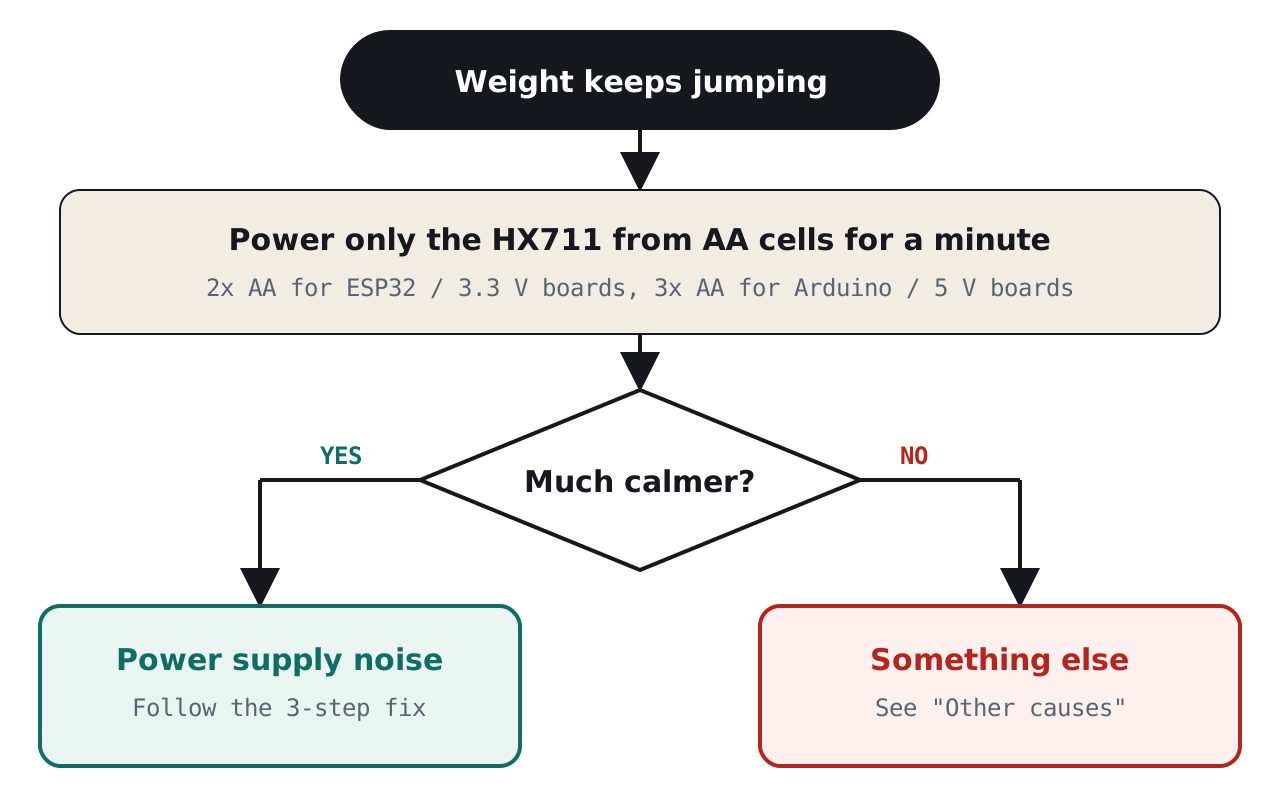
- It is calmer when powered from AA batteries
- It changes when you swap chargers or USB cables
- It gets worse when Wi-Fi, a motor or a relay switches on
- Tare (zero) does not hold for long
- You have already tried averaging in code, and it only partly helped
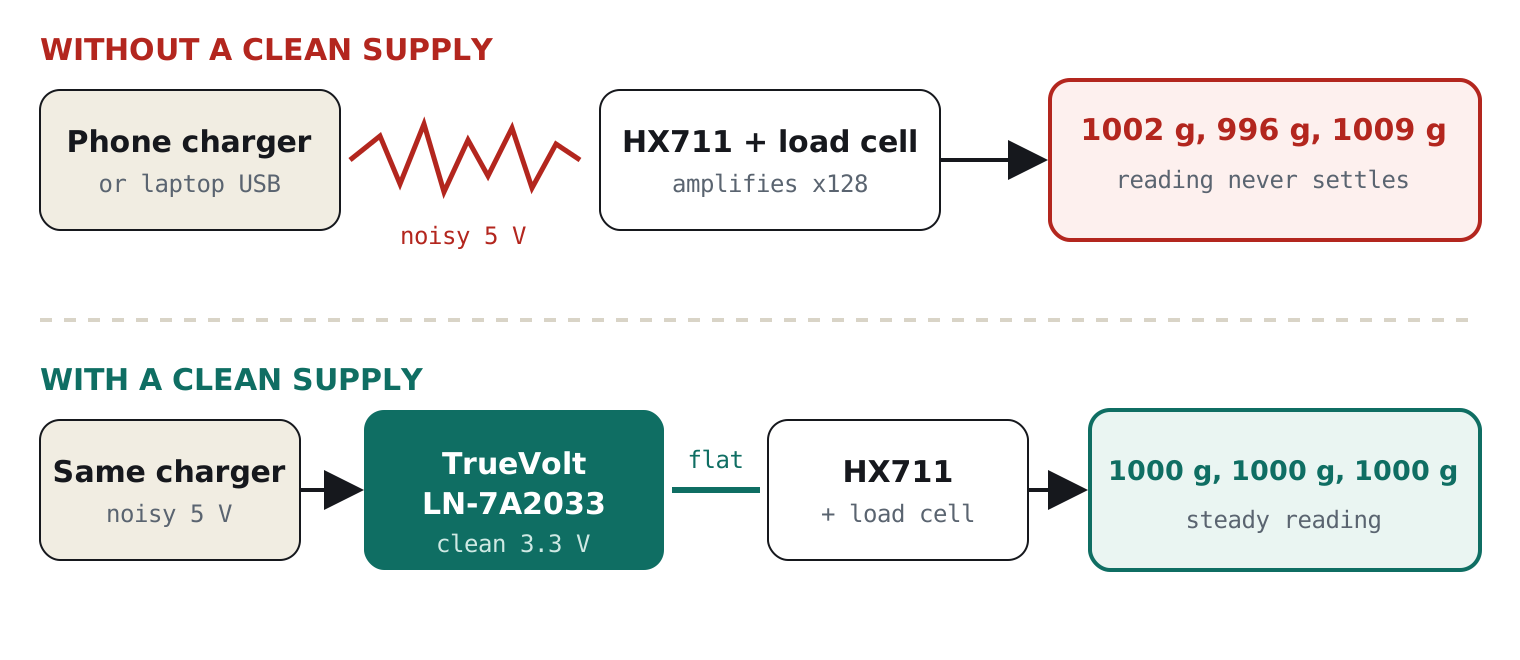
Why it happens, in one picture
A load cell produces a tiny signal, typically a few thousandths of a volt for the whole range of the cell. The HX711 amplifies that signal 128 times. Any noise riding on its power gets the same chance to sneak into the reading.
The 30-second test: is power really the problem?
You do not need an oscilloscope, just a few AA cells. Batteries are electrically quiet, so they make a clean reference. Power the HX711 from them for a minute and compare:
The fix in 3 steps
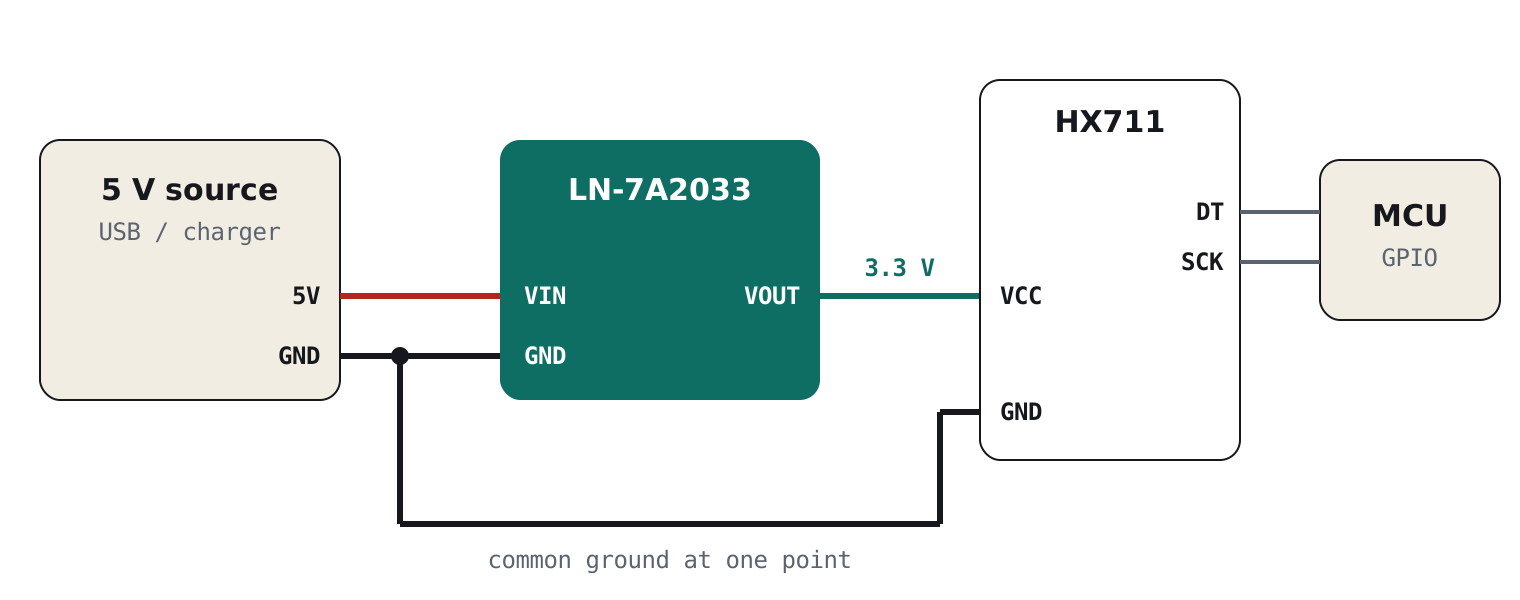
- Give the HX711 its own supplyDo not power it from the same pin as your Wi-Fi board, motor driver or relay. Put a low-noise 3.3 V regulator between your 5 V source and the HX711.
- Wire it as shown below5 V goes into the regulator. The regulator’s clean 3.3 V goes to the HX711’s VCC. Connect all grounds together at one point.
- Use 10 samples per secondMost green HX711 boards already default to 10 SPS. At this rate the chip is quieter and filters mains hum (see the datasheet).
Which board are you using?
| Your setup | How to connect |
|---|---|
| ESP32, Raspberry Pi Pico, STM32 (3.3 V boards) | Wire as in Figure 3. DT and SCK go directly to any GPIO. |
| Arduino Uno / Nano + green HX711 (5 V logic) | Power the HX711 from the clean 3.3 V and put a level shifter on SCK and DT, so the Arduino’s 5 V signals don’t overdrive the 3.3 V HX711. |
| Arduino + SparkFun HX711 (separate VCC and VDD pins) | Connect clean 3.3 V to VCC (analog side) and Arduino 5 V to VDD (logic side). No level shifter needed. |
Not using an HX711? The same fix applies
Every load-cell amplifier faces the same physics: a bridge signal of a few millivolts, amplified 64–128 times. Whatever chip you use, the supply feeding the bridge excitation and the ADC reference decides how steady your reading is.
| Chip / module | Where it’s used | What to feed from the clean 3.3 V |
|---|---|---|
| HX711 (green module, SparkFun) | Kitchen and hobby scales, the most common module | VCC (and E+ via the board). See the wiring above. |
| NAU7802 (SparkFun Qwiic Scale, Adafruit) | I²C scales on ESP32, Pico, Arduino | VDD/AVDD. Its internal regulator then has a quiet input to work from. |
| ADS1232 / ADS1234 (TI) | Commercial and industrial weighing | AVDD, the bridge excitation and REFP. Keep the reference ratiometric to the bridge. |
| ADS1220 (TI) | Multi-channel bridges, strain gauges, RTDs | AVDD and the bridge, with the bridge used as the external reference. |
| CS1237 / CS1238 (Chipsea) | HX711-style 2-wire modules in low-cost scales | VDD and the bridge excitation. |
| HX710B (pressure modules such as MPS20N0040D) | Air and water pressure, level sensing | VCC of the module. |
| INA125, INA826, AD8237 + MCU ADC | Analog instrumentation-amp front ends | The amplifier supply, the bridge excitation and the MCU’s ADC reference (AREF), all from the same clean rail. |
The clean supply we designed for this
TrueVolt LN-7A2033 · Clean power for sensors, radios & audio
A small module that sits between your 5 V and your sensor and outputs a quiet, steady 3.3 V.
- Genuine Texas Instruments TPS7A2033 regulator
- 7 µVrms noise and 95 dB ripple rejection at 1 kHz (TI datasheet)
- Ferrite filters on input and output, reverse-polarity protection
- 300 mA, enough for an HX711 plus several other sensors
- Designed and assembled in Pune, India
Still jumping? Other common causes
Power is the most common cause, but not the only one. If the 30-second test pointed elsewhere, check these:
| Cause | What you notice | Fix |
|---|---|---|
| Long, loose load-cell wires | Changes when you touch or move the wires | Keep wires short, twist them together, mount the HX711 near the cell |
| Load cell mounting | Slow drift, or a different reading after each placement | Use a rigid base, mount with spacers, apply load only on the free end |
| Temperature change | Slow drift over minutes | Let it warm up, keep it out of sun and drafts, tare after warm-up |
| Fast sample rate (80 SPS) | Fast, fine jitter | Use 10 SPS unless you need speed |
| Cheap or damaged HX711 board | Erratic values, or spikes even on battery | Try a different board |
For engineers: how supply noise reaches the reading
1. The signal is microvolts, the chip noise is nanovolts
A typical bar load cell is rated around 1 mV/V (check yours; some are 2 mV/V). Full-scale output is that figure times the excitation voltage. The HX711 datasheet specifies input-referred noise of about 50 nV rms at gain 128 and 10 SPS.
| 5 kg cell, 1 mV/V | Clean 3.3 V supply | 5 V supply (green board, AVDD ≈ 4.3 V) |
|---|---|---|
| Bridge excitation (≈ AVDD) | ≈ 3.1–3.2 V | ≈ 4.3 V |
| Full-scale signal | ≈ 3.2 mV | ≈ 4.3 mV |
| Signal per gram | ≈ 0.64 µV/g | ≈ 0.86 µV/g |
| Chip-noise limit (50 nV rms) | ≈ 0.08 g rms | ≈ 0.06 g rms |
Even at 3.3 V, the HX711 itself can resolve well under a gram on a 5 kg cell. When a scale wanders by several grams, the extra noise is coming from outside the chip: the supply, the wiring, the ground return, or the mechanics.
2. “Isn’t the HX711 ratiometric?” Yes, and that is only half the story
The bridge is excited from AVDD, and the ADC measures relative to AVDD. A slow change in AVDD scales the signal and the reference together, so it largely cancels. That is why a supply that is merely a little high or low does not ruin your reading.
The cancellation assumes the excitation and the reference see exactly the same noise at the same instant. In a real build they don’t:
- The PGA has finite supply rejection. Fast noise on the rail couples into the ×128 front end directly.
- Ground and return currents are shared. Charger, MCU and Wi-Fi currents flow through the same ground as the bridge, so the “zero” moves.
- Digital activity on DVDD (on boards where it is tied to the analog supply) injects switching noise.
- Ratiometric errors are proportional to load. Any uncancelled fraction grows as the weight on the scale grows.
So supply noise does not appear one-for-one in the reading. But on a shared, noisy rail it is very often the dominant error, which is consistent with how many forum fixes end with “it was the charger”.
3. What happens on a green HX711 board at 3.3 V
Most green boards set AVDD to about 4.3 V with a resistor divider, using the HX711’s on-chip regulator and an external transistor. Powered from 3.3 V, that regulator cannot reach 4.3 V and runs in dropout, so it no longer filters anything. Whatever is on your 3.3 V rail goes straight to the bridge and the ADC reference.
That is exactly why, at 3.3 V, the quality of the 3.3 V source matters so much. A noisy board 3.3 V pin passes its noise through. A low-noise LDO in front gives the HX711 a clean rail even though its own regulator has stopped helping.
4. Why the TPS7A2033 is a good fit
| Parameter (TI datasheet) | Value | Why it matters here |
|---|---|---|
| Output noise, 10 Hz–100 kHz | 7 µVrms | 7 µV ÷ 3.3 V ≈ 2 ppm. Even fully uncancelled, that is about 2 mg at 1 kg. |
| PSRR at 1 kHz | 95 dB | Charger ripple at 1 kHz is attenuated about 56,000×. |
| Dropout at 300 mA | 140 mV | Regulates cleanly from a sagging USB rail. |
| Quiescent current | 6.5 µA | Suitable for battery scales. |
Total load is small: the HX711 draws about 1.5 mA, and a 1 kΩ bridge at 3.3 V draws about 3.3 mA. Dissipation from a 5 V input is under 10 mW, so the regulator runs cold.
PSRR falls at higher frequencies, as it does for every LDO. That is why the module adds ferrite beads on input and output: the LDO handles low and mid frequencies, the ferrites handle the MHz hash from switching chargers.
Frequently asked questions
Why does my HX711 reading keep changing with nothing on the scale?
The most common cause is noise on the HX711’s power supply, usually from a phone charger, a laptop on charge, or a 5 V rail shared with Wi-Fi, motors or relays. Run the setup from batteries for a moment. If the reading calms down, give the HX711 its own clean, low-noise supply.
Why is my scale stable on battery but not on a charger?
Batteries are electrically quiet. Phone chargers and laptop chargers are switching supplies, which put fast noise and ground currents onto the 5 V line. The HX711 amplifies its tiny input 128 times, so that noise shows up as a jumping weight.
Can I power the HX711 from 3.3 V?
Yes. The HX711 works from 2.6 V to 5.5 V. At 3.3 V the load cell signal is about 25% smaller than on a typical 5 V board, but the chip can still resolve well under a gram on a 5 kg cell. With 5 V-logic boards like the Arduino Uno, use a level shifter on the data lines, or a board with separate VCC and VDD pins.
Will adding a capacitor fix HX711 noise?
A capacitor helps against fast spikes, but it does little against slower ripple and shared-ground noise from a charger. A low-noise regulator plus filtering handles both, which is why it works where a capacitor alone often doesn’t.
Does averaging in code fix it?
Averaging hides the noise but makes the scale slow to respond, and it cannot remove slow drift. Fix the source first, then average lightly if you still need to.
Should I use 10 SPS or 80 SPS?
Use 10 SPS unless you need fast updates. It has lower noise, and the HX711 datasheet specifies mains-frequency rejection at that rate.
Does this apply to NAU7802, ADS1232 and other load cell amplifiers?
Yes. Every load-cell amplifier amplifies a millivolt-level bridge signal 64–128 times, so supply noise reaches the reading the same way. Feed the chip’s analog supply, the bridge excitation and the ADC reference from one clean, low-noise rail. This applies to the NAU7802, ADS1232, ADS1234, ADS1220, CS1237 and analog front ends built on instrumentation amplifiers like the INA125 or INA826.
Why are my strain gauge or pressure sensor readings unstable?
Strain gauges and most pressure sensors are Wheatstone bridges, just like load cells. Their output is a tiny fraction of the excitation voltage, so a noisy supply makes the reading jump. Try the AA-cell test above, then power the bridge and the ADC reference from a clean low-noise regulator.
What power supply should I use for an HX711 load cell amplifier?
Use a dedicated low-noise linear regulator, not a shared board pin and not a switching supply directly. For example, the Ramanu TrueVolt LN-7A2033 (TI TPS7A2033, 7 µVrms) turns a noisy 5 V USB or charger supply into a clean 3.3 V rail for the HX711.
Fix it today
Give your scale a clean supply
One small module between your 5 V and your HX711, built on a genuine TI ultra-low-noise regulator and made in India. Cheaper than one failed demo.